Reports that explain your fixed asset figures
FMIS provides named reports for reviewing balances, financial movements and postings. Agree the companies, books, periods and analysis selections required for your reporting.
Choose an FMIS report for your finance task
| Finance task |
FMIS output |
| Review the asset register |
FMIS outputAsset register reports show costs, depreciation and book values, with summary or detailed views and analysis-code selections. |
| Review depreciation charges |
FMIS outputDepreciation reports help finance teams review charges and resulting values for the selected reporting context. |
| Explain opening and closing balances |
FMIS outputThe Summary Reconciliation Report explains movements between opening and closing cost and depreciation balances. |
| Investigate further financial movements |
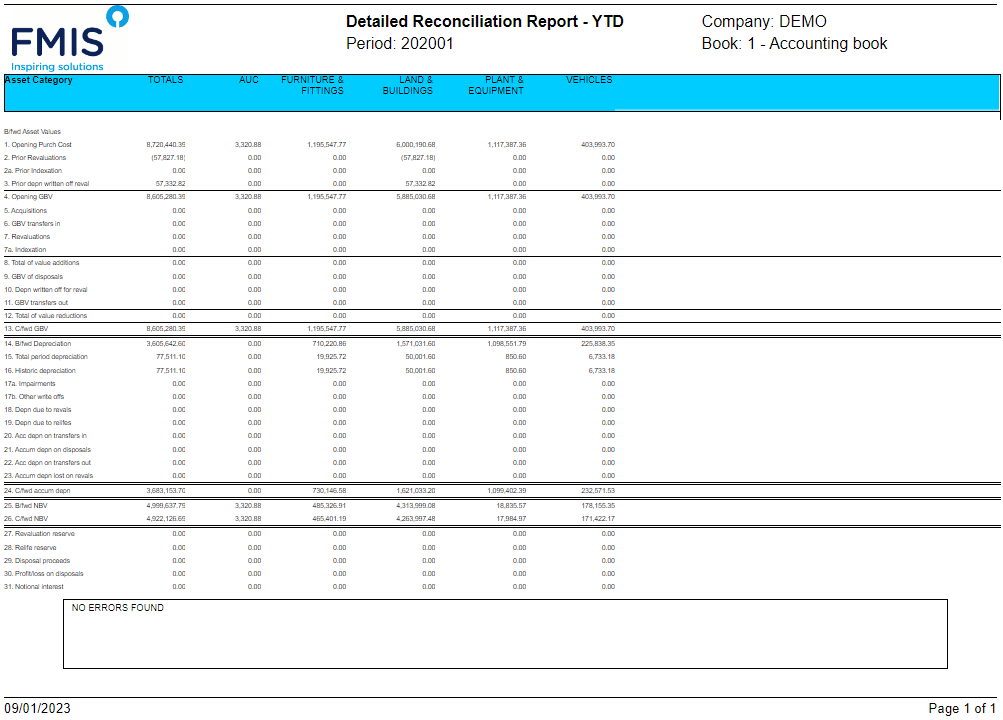
FMIS outputThe Detailed Reconciliation Report provides further movement detail, including relevant revaluations and life changes. |
| Investigate a journal total |
FMIS outputG/L Posting Reconciliation provides the asset-level values behind summarised postings. |
| Review financial asset events |
FMIS outputTransaction reports show events such as transfers, disposals and adjustments. |
For IFRS reporting, the IFRS Foundation’s IAS 16 Property, Plant and Equipment overview explains the accounting basis for these assets, including depreciation and impairment. Your finance team determines the accounting policies and reporting requirements; FMIS provides the records, calculations and outputs used in that process.
More focused G/L posting reconciliation
In version 12.47, the G/L Posting Reconciliation Report can group postings by up to three selected analysis profiles. Its Summary option combines values by those profiles, G/L rule and posting number, while detailed output remains available for reviewing individual asset values.
Read about the version 12.47 reporting changes.
Analyse and share the results
Main reports can be run for company groups, with combined asset totals or separate company presentation, subject to user access. Use analysis-code selections to organise the information around your reporting structure.
PDF and Excel options are available for supported reports. General ledger postings can be exported to Excel or CSV. Confirm the required report and format during scoping.