FMIS Mobile Asset Manager

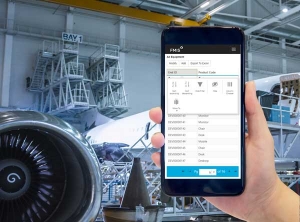
Track, manage and maintain your assets and equipment directly from your mobile phone or tablet using FMIS Mobile Asset Manager. Mobile Asset Manager extends the reach of FMIS Asset Tracking and Equipment Maintenance to any location saving you time, improving your visibility and giving you more control.

Why use FMIS Mobile Asset Manager?

✓ Easy to install for Android or iOS mobile devices
✓ Complete audits fast and accurately
✓ Quickly transfer, update or dispose of equipment
✓ Scan assets for easy identification
✓ Assign and transfer equipment in the field
✓ Reduce maintenance costs and equipment downtime

Features

✓ Check asset details with a simple barcode scan
✓ Complete maintenance work orders in the field
✓ Log equipment faults from your mobile device
✓ Barcode and RFID scanning for quick identification
✓ Manage the asset lifecycle
✓ Complete audits faster and more accurately

✓ Log faults and update the asset status
✓ Carry out maintenance work orders
✓ Add works instructions, images or attachments
✓ Record equipment calibration
✓ View all allocated work orders by user, status or location
✓ Set work orders for approval

✓ Create new assets
✓ Add or attach warranty information
✓ Record the full maintenance history
✓ Track the cost of repairs
✓ Assign assets to users or projects
✓ Transfer assets between locations
✓ Replace retired assets with new units
✓ Record inventories and audit history

✓ Scan asset barcodes, QR codes or RFID tags
✓ Use supplier asset codes or attach your own asset tags
✓ Scan assets to identify missing or misplaced assets quickly
✓ Complete check-in and check-out of equipment simply and accurately
✓ Add new assets received by scanning the asset tag

✓ Filter assets by location, user or project
✓ Identify all assets in or out of service
✓ Track equipment requiring maintenance
✓ Allocate inventory to work orders and projects

✓ Fully integrated with FMIS Equipment and Maintenance
✓ Assets and inventory stored centrally and updated in real-time
✓ Full reporting functionality within the desktop application

Integration

FMIS Active Asset is part of the FMIS Asset Management suite including FMIS Purchase Order Processing, Fixed Assets and Equipment and Maintenance. FMIS solutions can also be integrated with most leading ERP and finance packages to synchronise data such as job cost postings and utilisation charges.

Customer Reviews

FMIS Capterra Customer Reviews

Veteran Corps Equipment Maintenance“As our business developed and diversified, FMIS worked with us to improve speed and functionality for managing large quantities of items.”

Mike Kiess

Director of Quality Assurance, Veteran Corps of America

FMIS Testimonial from Doncasters Ltd“The FMIS system has been one of the most user friendly systems I have ever used.”

Bina Mistry

Financial Controller, Doncasters Ltd Group

FAQ

The app is compatible with both Android and iOS devices.

Yes, the Mobile Asset Manager supports barcode, QR code, and RFID tag scanning for quick and accurate asset identification and updates.

Yes, the app supports lifecycle management tasks, such as recording acquisition details, logging maintenance history, tracking repair costs, and managing asset disposal.

Yes, the app simplifies asset audits by allowing users to complete them quickly and accurately using mobile scanning capabilities.

Yes, you can log and track maintenance tasks, including work orders and equipment faults, ensuring timely upkeep and reduced downtime.

A fixed asset is a tangible or intangible resource owned by a company and used in its operations to generate value over a long-term period. Examples include property, plant, equipment, vehicles, and IT hardware. These assets are not intended for immediate resale but are instead essential for day-to-day business activities.

Yes, FMIS offers training to enable your team can use the system effectively, maximising its value.

FMIS follows industry best practices for data security, including encryption, role-based access control, and secure system integrations.

Pricing depends on factors like the number of users, required modules, and deployment method. Contact us to discuss your needs and request a personalised quote using our contact form.

FMIS Fixed Assets version 12.47 product update

What is new in FMIS Fixed Assets version 12.47

See what has changed in FMIS Fixed Assets version 12.47, including percentage-based indexation, improved G/L reconciliation and clearer multi-company information.
FMIS Lease Accounting version 12.47 product update

What is new in FMIS Lease Accounting version 12.47

FMIS Lease Accounting version 12.47 includes reporting and import performance improvements, together with additional support for defined data-conversion scenarios.
FMIS Fixed Assets Integration with AccountMate Software

AccountMate Fixed Asset Integration with FMIS

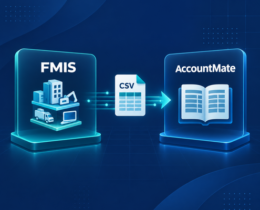
FMIS integrates with AccountMate to transfer fixed asset General Ledger posting data through a controlled process, reducing manual re-entry.
Industrial machine beside diagrams representing straight-line, reducing-balance and usage-based depreciation

Asset Depreciation Methods Explained for UK Businesses

Learn the asset depreciation methods used by UK businesses, including straight line and reducing balance, and how to choose the right one for FRS 102 compliance.
how to conduct fixed asset audit

How to Conduct a Fixed Asset Audit: Step by Step

A guide to conducting a fixed asset audit, from planning and physical verification to reconciling ghost assets and updating your register for UK finance and asset teams.