FMIS strengthens its AccountMate fixed asset integration
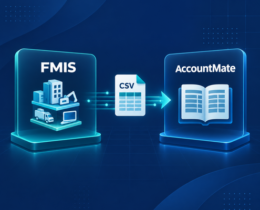
FMIS has strengthened its existing AccountMate fixed asset integration, giving finance teams a more straightforward way to transfer General Ledger (GL) posting information from FMIS Fixed Asset Management into AccountMate. The one-way, CSV-based process reduces manual re-entry while allowing organisations to use specialist fixed asset accounting alongside their existing AccountMate system.
Written by: John de Robeck • Published: September 9, 2026 • Updated: September 21, 2026
The AccountMate fixed asset integration with FMIS is particularly relevant to AccountMate customers and resellers that need greater control over asset records, depreciation calculations and financial reporting than a general accounting system may provide on its own.
AccountMate fixed asset integration at a glance
Information transferred: fixed asset GL posting data and journal entries
Direction: from FMIS into AccountMate
Format: CSV file
Tested version: AccountMate 13
Configuration: settings are applied within FMIS, with no additional configuration required in AccountMate
How does the FMIS AccountMate integration work?
FMIS Fixed Asset Management provides a dedicated environment for maintaining asset records, running depreciation calculations and producing the accounting information required for the General Ledger.
The integration provides a controlled route for moving the resulting GL posting information into AccountMate:
Prepare the asset accounting information in FMIS. Finance teams maintain their fixed asset records and complete the relevant calculations and checks within FMIS.
Generate and export the posting data. The required GL posting information is produced from FMIS and exported in CSV format.
Import the file into AccountMate. The CSV file is imported into the AccountMate General Ledger, reducing the need to re-enter the same information manually.
What information does the integration transfer?
The integration transfers fixed asset GL posting information, including the journal entries produced for AccountMate. General Ledger accounts must be mapped correctly so that imported data reaches the intended accounts and supports accurate financial statements.
What does the integration not include?
It does not transfer complete asset records, provide real-time synchronisation or replace AccountMate processes outside the fixed asset posting workflow.
Compatibility and configuration
The functionality has been tested with AccountMate 13 and forms part of the standard FMIS system, although it is not enabled by default.
A small number of settings need to be configured within FMIS to support the required AccountMate format. No additional configuration is required within AccountMate for the tested process.
Implementation and technical requirements
Implementation includes confirming the AccountMate version, agreeing the CSV format, mapping the relevant General Ledger accounts and testing the import process. This allows finance teams to review the posting information before it is transferred and confirm that the resulting journal entries are correct.
What are the benefits for AccountMate customers?
The integration allows AccountMate customers to use a specialist fixed asset management solution without replacing their wider accounting system.
Practical benefits include:
Reduced duplicate entry by removing the need to rekey fixed asset GL posting information in AccountMate.
Lower risk of transcription errors when transferring journal entries between the fixed asset register and General Ledger.
A more consistent period-end process for finance teams preparing, reviewing and posting fixed asset accounting information.
Clear separation between systems, with detailed asset accounting managed in FMIS and the resulting postings transferred to AccountMate.
Access to specialist fixed asset functionality, including multiple depreciation methods, configurable depreciation schedules, detailed asset records, audit trails and reporting capabilities.
The result is a practical connection between the fixed asset subledger and the wider accounting system, while retaining the controls required for accurate financial management and reporting.
About FMIS Fixed Asset Management
FMIS Fixed Asset Management is designed for finance teams that need to manage fixed assets and support asset tracking in greater detail across different asset types. It supports the asset lifecycle from acquisition through depreciation, transfers, revaluations, impairments and disposal.
Finance teams can track individual assets, use automated depreciation calculations, apply multiple depreciation methods and schedules, and maintain a clear audit trail across the asset portfolio. Detailed reports provide clearer information for period-end processing, financial statements and audit review.
For AccountMate customers, the integration means these specialist capabilities can operate alongside the existing accounting software, with GL posting data transferred through a defined process.
Since then, AccountMate has referred fixed asset management opportunities to FMIS, and the two organisations have collaborated on webinars and other partner activity. The latest integration work reflects increasing interest from AccountMate customers and resellers looking for more specialist fixed asset accounting capabilities.
“AccountMate customers have a wide range of operational and financial requirements, and specialist partners help extend the options available to them. FMIS provides dedicated fixed asset management functionality for organisations that need greater control over their asset records, accounting processes and reporting.”
Katie Bryson, Director of Marketing, AccountMate Software Corporation
Frequently asked questions
What information transfers from FMIS to AccountMate?
The integration transfers fixed asset GL posting information generated in FMIS. It does not transfer the complete asset register or operational asset records.
Is the AccountMate integration real-time?
No. It is a controlled, one-way process using a CSV export from FMIS and an import into AccountMate.
Which AccountMate version has been tested?
The functionality has been tested with AccountMate 13 and will be tested against future versions as released. Customers using another version should confirm compatibility with FMIS before implementation.
Does the integration require additional configuration?
The functionality requires a small number of settings within FMIS and is not enabled by default. No additional configuration is required within AccountMate for the tested process.
Find out more about fixed asset management for AccountMate
The integration forms part of FMIS’s wider support for AccountMate customers. To discuss the functionality or confirm compatibility with your environment, visit Fixed Asset Management for AccountMate or contact the FMIS team.
FMIS integrates with AccountMate to transfer fixed asset General Ledger posting data through a controlled process, reducing manual re-entry.
https://www.fmis.co.uk/wp-content/uploads/2026/09/FMIS-AccountMate-Integration-for-FMIS-Fixed-Assets.webp450495John de Robeckhttps://www.fmis.co.uk/wp-content/uploads/2026/04/FMISNavyTeal-1-150x80-1.webpJohn de Robeck2026-09-09 17:48:582026-09-21 18:12:04AccountMate Fixed Asset Integration with FMIS
FMIS partners with AccountMate Software to offer customers industry-leading Fixed Asset Management, Asset Tracking and Lease Accounting
https://www.fmis.co.uk/wp-content/uploads/2022/09/Fixed-Asset-Management-for-AccountMate-v2.jpg400495John de Robeckhttps://www.fmis.co.uk/wp-content/uploads/2026/04/FMISNavyTeal-1-150x80-1.webpJohn de Robeck2022-09-14 10:10:062026-08-20 16:46:49Fixed Asset Management for AccountMate Software


 https://www.fmis.co.uk/wp-content/uploads/2026/09/FMIS-AccountMate-Integration-for-FMIS-Fixed-Assets.webp
450
495
John de Robeck
https://www.fmis.co.uk/wp-content/uploads/2026/04/FMISNavyTeal-1-150x80-1.webp
John de Robeck2026-09-09 17:48:582026-09-21 18:12:04AccountMate Fixed Asset Integration with FMIS
https://www.fmis.co.uk/wp-content/uploads/2026/09/FMIS-AccountMate-Integration-for-FMIS-Fixed-Assets.webp
450
495
John de Robeck
https://www.fmis.co.uk/wp-content/uploads/2026/04/FMISNavyTeal-1-150x80-1.webp
John de Robeck2026-09-09 17:48:582026-09-21 18:12:04AccountMate Fixed Asset Integration with FMIS


