ASC 842 lease accounting software

FMIS Lease Accounting helps finance teams manage operating and finance leases under ASC 842, the US GAAP lease accounting standard. Maintain property, vehicle and equipment leases, calculate right-of-use assets and lease liabilities, and prepare period reporting and general ledger posting outputs.

Explore the calculations, reporting and implementation options below, or arrange a demonstration around your lease portfolio.

Updated by: • Updated: October 12, 2026

Is FMIS suitable for your ASC 842 reporting?

FMIS is designed for lessee accounting: the organisation using the leased asset. It supports financial controllers, finance managers and reporting teams maintaining lease records, reviewing changes and completing recurring accounting periods.

  • Replace separate spreadsheets with maintained lease records, calculated schedules and a retained adjustment history.
  • Review lease balances and movements through standard reports, with company and company-group reporting.
  • Prepare lease accounting postings for transfer into your existing finance system.

ASC 842 reporting can be relevant to organisations and subsidiaries outside the US. The required accounting framework matters more than location. FMIS Lease Accounting does not support multi-currency accounting; discuss foreign-currency leases and translated group reporting during the initial assessment.

How FMIS supports ASC 842 lease accounting

Bring the lease terms, calculation inputs and reporting process into one system. Your finance team determines the lease classification, term, discount rate and accounting policies; FMIS calculates values from the recorded inputs.

Operating and finance lease calculations

Calculate lease liabilities and ROU asset values from the recorded payment terms. FMIS supports straight-line lease expense and ROU asset amortisation for operating leases, alongside finance lease accounting. Review the schedules behind your period values.

Mid-term adjustments and early terminations

Process revised payments, extensions and early terminations. Preview adjustment calculations and retain earlier numbered lease versions. Excel import routes are available for adjustments and terminations across larger portfolios.

Period reporting and posting outputs

Use standard reports to review period values, roll-forward movements and future payments. Configure general ledger rules and account mappings for your finance-system posting process, with controls for completed periods.

What does ASC 842 require?

ASC 842 is the US GAAP standard for leases. Lessees generally recognise a right-of-use asset and lease liability for both operating and finance leases, subject to scope and permitted reliefs.

Operating and finance leases have different expense models

Operating leases generally produce a single straight-line lease expense. Finance leases recognise interest on the liability and amortisation of the ROU asset separately. Both models require maintained lease balances.

The inputs reflect the agreement and accounting assessment

Assess the lease term, options, payment obligations and contract components. The initial liability discounts unpaid lease payments; prepayments, incentives and initial direct costs can make the ROU asset differ from the liability.

Changes and reliefs need the correct treatment

ASC 842 permits an election for qualifying short-term leases, but has no IFRS-style low-value recognition exemption. A modification and a variable payment change can require different treatment; a change in an index alone does not trigger liability remeasurement.

FMIS supports the records, calculations and reporting process. Your team approves the accounting treatment and resulting entries, including how changes affect the lease classification and discount rate.

For classification, worked examples and disclosure checks, read the ASC 842 lease accounting guide.

Refer to FASB Accounting Standards Codification Topic 842 for the accounting requirements

From lease records to reviewed accounting outputs

Import and maintain the lease information

Create leases individually or import them using a system-generated Excel template. Record payment terms, analysis codes, descriptions and notes, and attach supporting documents. Agree which lease attributes your team needs to hold during configuration.

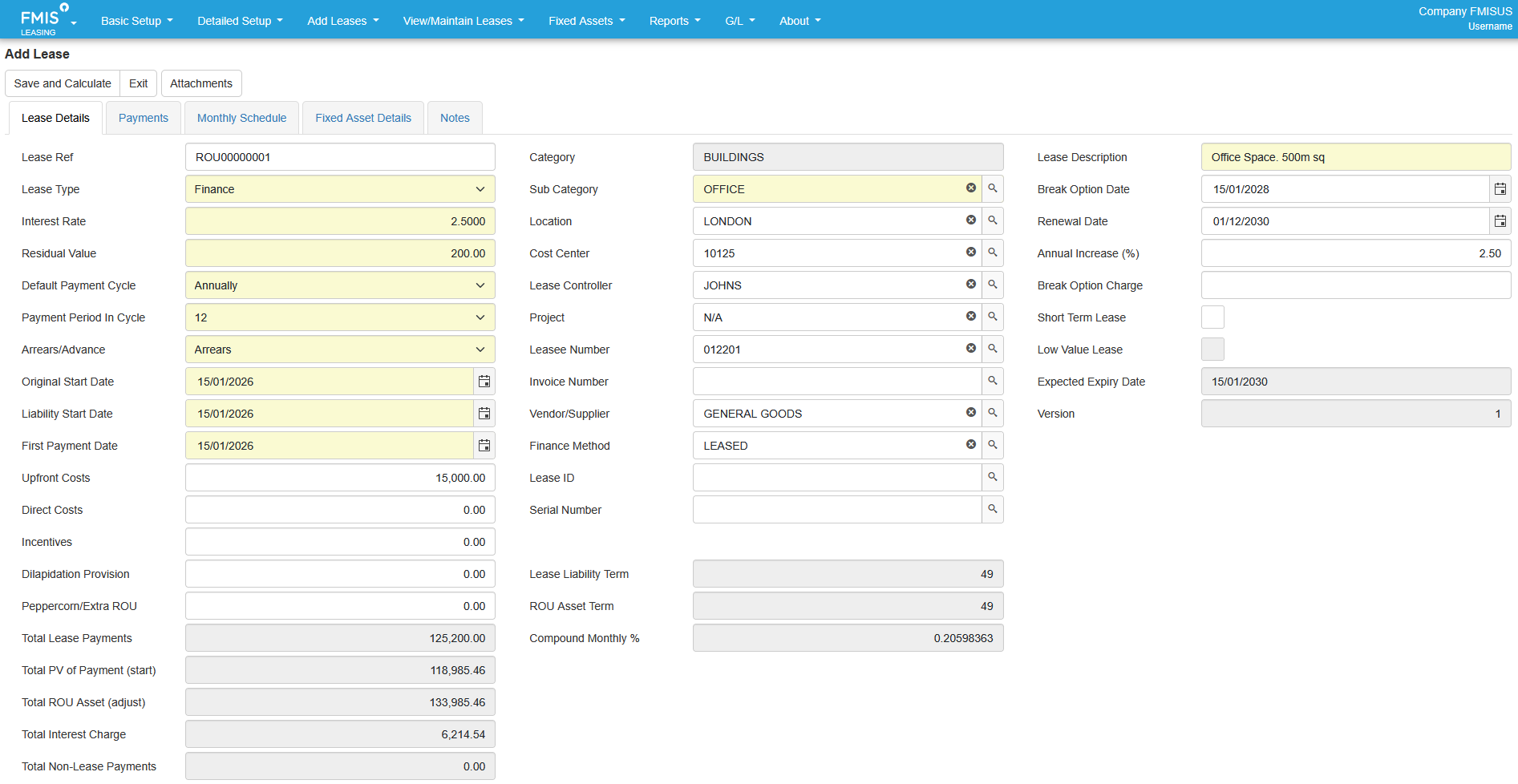
FMIS finance lease record showing lease classification, payment terms, present value, ROU asset value and total interest.
FMIS lease record showing finance lease classification, payment assumptions and calculated lease values. Open the full-size screenshot.

Review the calculated schedule

Review payments, interest and opening and closing liability balances, alongside the related ROU asset information. Use a representative operating lease and finance lease during the demonstration to examine the required calculation and posting outputs.

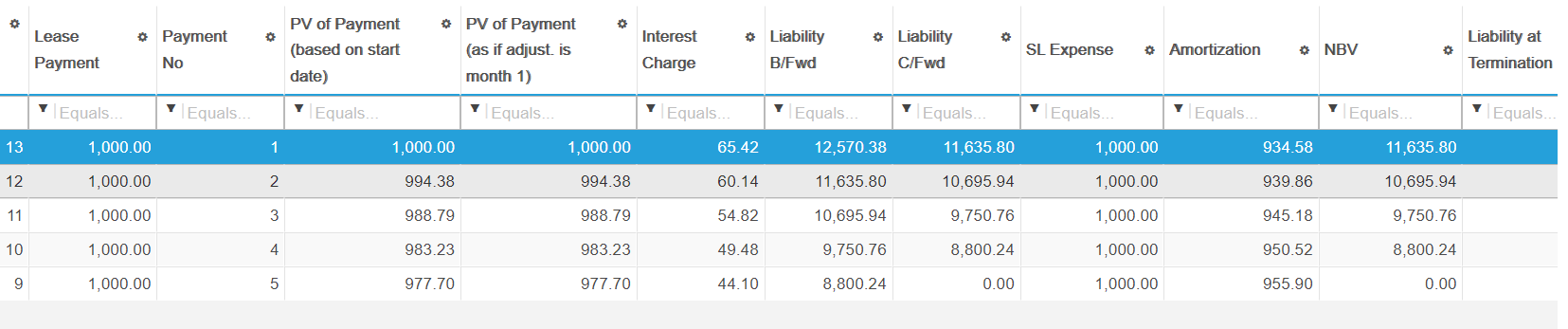
FMIS ASC 842 operating-lease schedule showing payments, interest, liability balances, straight-line expense and ROU asset amortisation.
Example ASC 842 operating-lease schedule showing straight-line expense and ROU asset amortisation alongside payment and liability values. Open the full-size screenshot.

Process changes with a retained history

For an extension or contractual payment change, enter the effective date and revised inputs, then preview the calculation before completing the adjustment. FMIS creates a new numbered version and retains the earlier record. Early termination processing is also available.

Apply the appropriate accounting treatment

An agreed extension and a payment increase under an existing index clause are different events. Your finance team decides whether a change requires remeasurement, a revised rate or separate expense recognition. Review the required workflow with FMIS rather than treating every payment change as a liability adjustment.

ASC 842 reporting and period controls

Standard reports cover lease balances, movements, period values and future payments, with company or company-group selection and analysis fields for review. Most reports provide Excel or PDF output; the Audit Log is Excel-only.

Lease reporting tasks and relevant FMIS outputs
Reporting task FMIS output or process
Review the figures behind period totals Lease Values by Period and Lease Details reports, with lease-level information and analysis codes.
Reconcile opening balances to closing balances Reconciliation Report for roll-forward and movements reporting for the selected year.
Review aged balances and time bands Values by Year report for short-, mid- and long-term analysis of key values. Check the selected bands against your presentation requirements.
Review future payment commitments Future Payments and Payments by Year reports. Use the relevant payment population and reporting date when preparing disclosure working papers.
Prepare postings for the finance system Configured general ledger rules, code derivations and account mappings. Agree the transfer format and review the resulting entries before import.
Trace record changes Retained lease versions and the Audit Log report, with date, lease, user and event filters. Audit Log output is an Excel download.
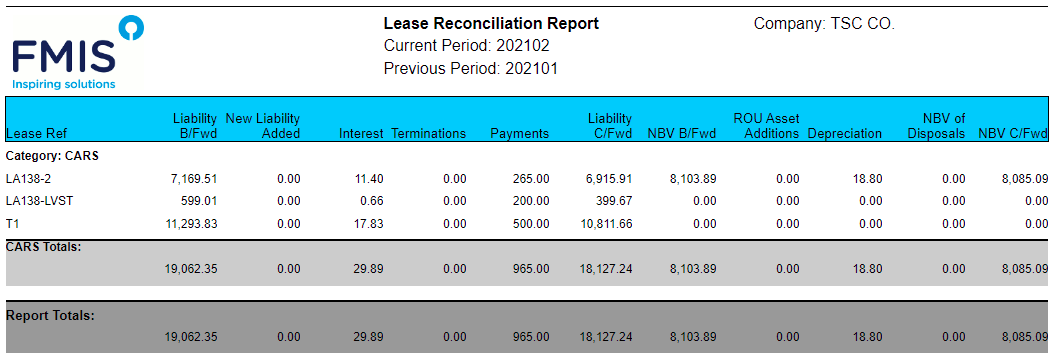
FMIS Reconciliation Report showing opening and closing lease liability and ROU asset balances, payments, interest and movements.
Example standard Reconciliation Report showing lease liability and ROU asset movements between selected reporting periods. Open the full-size screenshot.

Protect reviewed periods and handle late information

Close a period after reviewing its outputs to prevent new leases or changes from affecting its values. Where a correction requires it, the period can be reopened and reprocessed through your agreed finance procedures.

Alternatively, new leases and mid-term adjustments can be backdated so that their accumulated impact is recognised in the current open month while closed periods remain unchanged. Your finance team approves the appropriate treatment for the circumstances.

Use the reports to prepare disclosure working papers

ASC 842 disclosures include lease costs, cash-flow information, weighted-average remaining terms and discount rates, and separate maturity analyses for operating and finance lease liabilities. FMIS reports provide relevant accounting data; reconcile the figures and complete any additional calculations and narrative disclosures required.

Customer experience: importing and linking lease records

St George’s University Hospitals NHS Foundation Trust

St George’s selected FMIS Fixed Assets in 2017 and added Lease Accounting in 2022 for its IFRS 16 transition. Both modules now use UK cloud hosting.

Existing finance leases needed to link to assets already on the register. FMIS provided an import process that retained the asset identifiers and linked the records, helping the Trust avoid duplicate ROU assets.

The finance team also received guidance on reconciling lease and asset values. The case study describes the Trust’s IFRS 16 implementation and the practical work involved in importing and linking its existing leases.

Read the St George’s fixed asset and lease accounting case study

Migration, implementation and finance-system transfer

Moving an existing ASC 842 portfolio into FMIS requires an agreed migration date, starting balances and reconciliation process. Changing software does not, by itself, mean adopting the standard again.

Prepare the records and agree the attributes

Your team identifies the leases to include and supplies the approved accounting assumptions. FMIS helps configure the lease attributes to be held, import fields and reporting process. Prepare references, companies, descriptions, dates, payment terms, discount rates, classification information, existing balances and relevant adjustment history.

Reconcile the starting position

Use the configured Excel templates and review row-level import errors. Reconcile lease numbers, liability balances, ROU carrying values and required outputs to your source records and general ledger. Test representative operating and finance leases, changes and terminations before the first live close.

Work with your existing finance system

Agree the account codes, posting-file format and transfer process for your accounting or ERP system. FMIS provides configurable posting outputs; a direct interface depends on the destination system and agreed scope. Review existing payment and asset postings to avoid duplicate entries.

Plan the first close and train the team

Implementation can cover company structures, analysis codes, reporting periods, permissions, lease-to-asset links and general ledger mappings. Training covers record maintenance, changes, review and reporting, with ongoing functional and technical support. The timetable depends on data preparation, configuration, testing and your team’s availability.

Cloud or on-premise deployment

FMIS Lease Accounting is available through FMIS Cloud or as an on-premise installation. Assess hosting, access and data residency alongside your organisation’s IT requirements.

FMIS Cloud

For the UK-hosted service, customer data is held in UK data centres, with encryption in transit and at rest, controlled access, backups and recovery arrangements.

On-premise deployment

Install FMIS within your own infrastructure where internal hosting is required. Agree the infrastructure, access, support and operational responsibilities during scoping.

Security information for your IT review

FMIS holds ISO 27001, ISO 9001 and Cyber Essentials Plus certifications. The Trust Centre provides information about security controls, testing, data protection and business continuity for your supplier review.

Visit the FMIS Trust Centre

ASC 842 software FAQs

FMIS Lease Accounting is designed for lessee finance teams maintaining property, vehicle and equipment leases. The ASC 842 reporting requirement may arise from US financial statements or group reporting instructions for a subsidiary elsewhere.

Yes. FMIS supports both operating and finance lease accounting under ASC 842, including straight-line lease expense and ROU asset amortisation for operating leases. The demonstration can show the calculations and posting outputs for representative agreements.

Yes. Excel import templates support new lease records, with import routes also available for adjustments and terminations. Agree the migration method and starting position, then reconcile the imported balances and outputs before the first live reporting period.

FMIS can recognise the accumulated impact of a backdated new lease or mid-term adjustment in the current open month without changing closed periods. Reopening and reprocessing is another available route. Your finance team decides which treatment is appropriate.

FMIS provides data for balances, movements, period values and future payments. These outputs support disclosure preparation. Your finance team still needs to reconcile the figures and complete any additional calculations and narrative disclosures required for its arrangements.

No. ASC 842 has no IFRS-style low-value recognition exemption. A qualifying short-term lease has a term of 12 months or less at commencement and no purchase option that is reasonably certain to be exercised. The short-term policy election is made by asset class.

Your finance team supplies and approves the accounting assumptions. Eligible lessees that are not public business entities can elect a risk-free rate by underlying asset class, but must use a readily determinable implicit rate where applicable. FMIS calculates from the agreed inputs.

FMIS supports multiple companies, company access permissions and company-group reporting. FMIS Lease Accounting does not support multi-currency accounting. It does not maintain exchange rates or convert lease values between currencies. Discuss foreign-currency leases and translated reporting during scoping.

FMIS produces posting outputs using configured general ledger rules and account mappings. Agree the file format and transfer process for your system during implementation. Direct interfaces require an assessment of the destination system and the proposed scope.

Users, lease portfolio, company structure, deployment, data migration, training and interface requirements affect the proposal. The timetable also depends on the condition of your data and the time available for reconciliation and testing.

See how FMIS would handle your ASC 842 lease portfolio

Arrange a demonstration covering an operating lease, a finance lease, a mid-term adjustment and the reporting and posting outputs. Tell us your approximate lease numbers, company structure, currencies, finance system and target reporting date so that we can focus on the requirements that matter to you.

Book an ASC 842 software demo

Please include your approximate lease numbers, reporting framework, company structure and finance system in the message field so that we can prepare a relevant demonstration. Alternatively, call us on +44 (0) 1227 773003 to arrange a time.

    Name *

    Organisation *

    Email *

    Phone *

    Additional information

    What do you require?

    We ask for a few details so we can send the right information and follow up appropriately.

    We do not pass your contact details outside FMIS.

    Choose a time

    Schedule a call to discuss your ASC 842 reporting, lease portfolio and implementation requirements with FMIS.

    Select a time using the calendar below to speak with a consultant. Alternatively, you can contact us here.

    • 10-20 minute call with an FMIS consultant.
    • You will receive Microsoft Teams call joining details via email after booking.

    Get a quote

    Complete the form below for a tailored quote. Please include your approximate lease numbers, reporting framework, users, company structure and deployment requirements in the message field. Alternatively, call us on +44 (0) 1227 773003 to speak with one of the team.

      Name *

      Company *

      Email *

      Phone *

      How many user licences do you need?

      How many assets are you tracking?

      How many separate companies do you want to manage?

      Is there anything further you can tell us that will help us understand your requirements?

      Which FMIS products do you require?

      Please note that your estimated quote will include hosting, training, and set-up costs.

      For on-premise solutions, please reply to the email we send you or contact us directly.

      This quote is provided as an estimate based on the information available and may include certain assumptions. Please review the details carefully to ensure they reflect your requirements.

      Download a brochure

      Complete the form below to request an FMIS brochure. If you also have a software enquiry, include your reporting framework and approximate lease numbers in the message field. Alternatively, call us on +44 (0) 1227 773003 to speak with one of the team.

        First name*

        Last name*

        Job title*

        Company*

        Email address*

        Phone number

        Anything else we should know?

        What would you like information about?*


        We ask for a few details so we can send the right information and follow up appropriately. We use your details to respond to your enquiry. See our Privacy Policy.