FRS 102 lease accounting software

FMIS Lease Accounting helps finance teams manage property and equipment leases under revised FRS 102. Maintain lease records, calculate right-of-use assets and lease liabilities, and prepare postings and reports in one system.

Manage initial setup and ongoing reporting with FMIS implementation support and a choice of cloud or on-premise deployment.

FRS 102 accounting document connecting leased property and equipment with financial records.

Updated by: • Updated: October 12, 2026

Is FMIS suitable for your FRS 102 lease portfolio?

FMIS supports companies reporting under FRS 102 that manage leases from the lessee’s perspective. It gives accountants, finance managers and financial controllers a maintained lease register, calculated schedules and period outputs for review.

It is particularly useful where recurring reporting, rent reviews or other changes make separate spreadsheets difficult to maintain. Records can be entered individually or imported from Excel, with reporting available for individual companies and company groups.

This page explains how FMIS handles the work, which outputs your team can review and what is involved in implementation. For an overview of the wider product, visit our Lease Accounting Software page.

How FMIS supports revised FRS 102

The revised Section 20 lease requirements apply to accounting periods beginning on or after 1 January 2026. Lessees recognise right-of-use assets and lease liabilities for most leases, subject to the standard’s scope and exemptions.

For your finance team, this means maintaining the records and calculations behind the balances, recording changes and preparing supporting information for each reporting period.

For the accounting requirements, exemptions, borrowing rates and transition decisions, read our FRS 102 Lease Accounting Guide.

Calculator and accounting records representing lease value calculations.

Calculate lease values

Use agreed lease terms, payments and discount rates to calculate lease liabilities and right-of-use asset values. Review the schedules behind the resulting figures.

Lease document versions and a calendar representing changes over time.

Maintain changes over time

Process revised payments, changes to lease terms and early terminations. Review updated values alongside retained versions of the lease.

Reporting records with a padlock and review checkmark representing period controls.

Prepare period outputs

Produce postings, liability information and reconciliation reports. Use period controls to restrict changes after your team’s review.

FRS 102 reporting and period controls

Move from a portfolio balance to the individual records behind it. FMIS provides summary and detailed reports to help your team reconcile lease values and prepare information for financial reporting and audit queries.

Choose the output that fits the reporting task

Reporting task FMIS output or process
Review payments, interest and liability balances Calculated lease schedules and Lease Values by Period reports.
Review current and non-current lease liabilities Values by Year reporting, with liability splits across future periods.
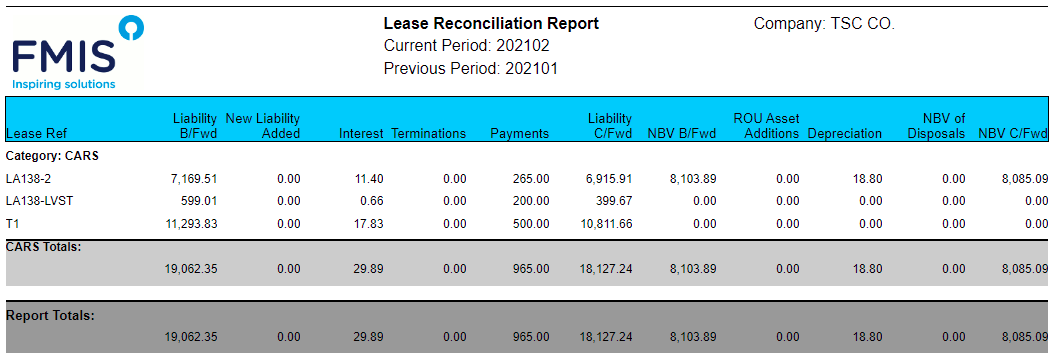
Explain movements in lease and right-of-use asset values Reconciliation reporting covering additions, adjustments and terminations.
Review future payments Future Payments reporting at summary or individual lease level.
Prepare entries for your finance system Configurable general ledger posting rules and exportable posting lines.
Check changes to recorded lease information Lease version history and an Audit Log report.

Excel and PDF outputs are available for many reports. During a demonstration, we can compare the available outputs with the information your team needs for its FRS 102 accounts and supporting schedules.

FMIS example lease reconciliation report showing liability and right-of-use asset movements.

Example FMIS reconciliation report showing lease liability and right-of-use asset movements. Source: Lease Accounting v12.47 manual. Select the screenshot to enlarge it.

Control changes after review

Close the accounting period once your team has reviewed its outputs. This locks values against subsequent changes affecting that period.

Where a correction requires a period to be reopened, authorised users can reopen and reprocess it under your agreed finance procedures. Any entries already transferred to the finance system must also be reviewed and reconciled; reopening FMIS does not automatically reverse those entries.

Portfolio reports linked to individual lease records and a locked accounting period.

Customer experience of FMIS Lease Accounting

“FMIS offers the most comprehensive fixed asset management and leasing software we’ve seen for healthcare.”

“The system is very intuitive and user-friendly, covering all of our requirements. It also provides us with lease accounting for US and UK GAAP”

“Excellent summary and detailed reports with a user-friendly system.”

“I find it easy to use and most of all – I like the way you can pull reports by different criteria”

“The training gave us a clear and thorough introduction to the system, which made getting started much easier. ”

St Georges NHS Fixed Asset and Lease Accounting Case Study hero image

Lease accounting in practice: St George’s University Hospitals

St George’s University Hospitals NHS Foundation Trust added FMIS Lease Accounting in 2022 to support its IFRS 16 transition, building on its existing FMIS Fixed Assets system.

The implementation addressed a practical challenge: importing existing finance leases while retaining asset identifiers and linking records between the two modules. The approach was designed to avoid duplicate right-of-use assets, with specialist guidance on reconciling asset values and handling adjustments.

This is an IFRS 16 implementation example showing FMIS migration and reconciliation experience; it is not evidence of a revised FRS 102 implementation.

Read the St George’s fixed asset and lease accounting case study

How FMIS handles your lease accounting workflows

Import and maintain lease records

Create individual records or import leases using the FMIS Excel template. Record the dates, payment terms, discount rate and analysis information needed for your calculations and reporting.

Payment cycles include monthly, quarterly and annual payments, with payments made in advance or arrears. Import checking identifies errors that need correction before the records are loaded.

Calculate liabilities and right-of-use assets

FMIS calculates the lease liability and right-of-use asset values from the information entered. Review payments, interest and liability balances over the lease term.

Your finance team determines the lease term, discount rate and accounting treatment, including which contract components and payments should be included.

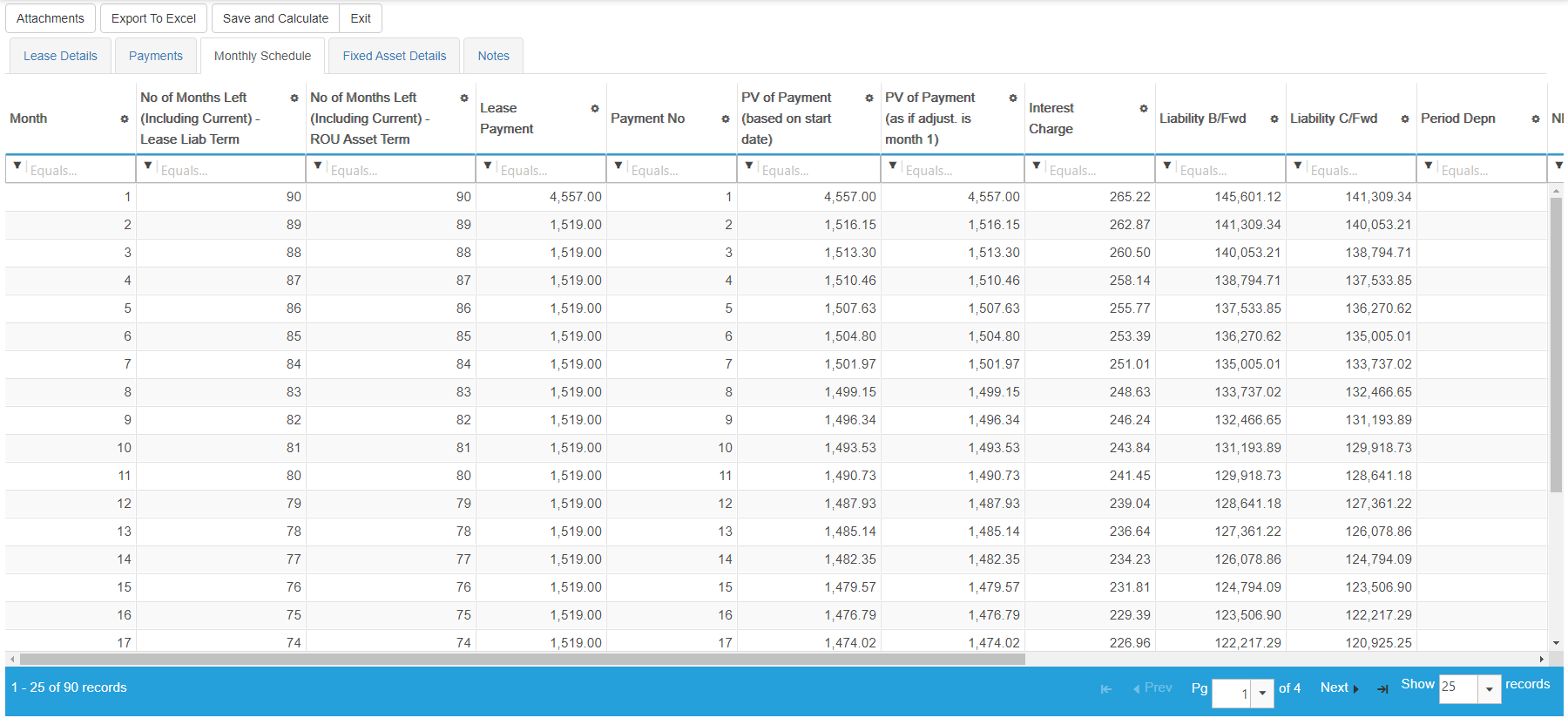
FMIS monthly lease schedule showing payments, interest and opening and closing lease liability balances.

Review payments, interest charges and opening and closing liability balances. Select the screenshot to enlarge it.

Process changes during the lease term

Record revised payments following a rent review, amend the lease term or process an early termination. Review the effect on the schedule and related accounting values.

FMIS retains previous lease versions so your team can examine the information before and after an adjustment. Imports are also available for adjustments and terminations.

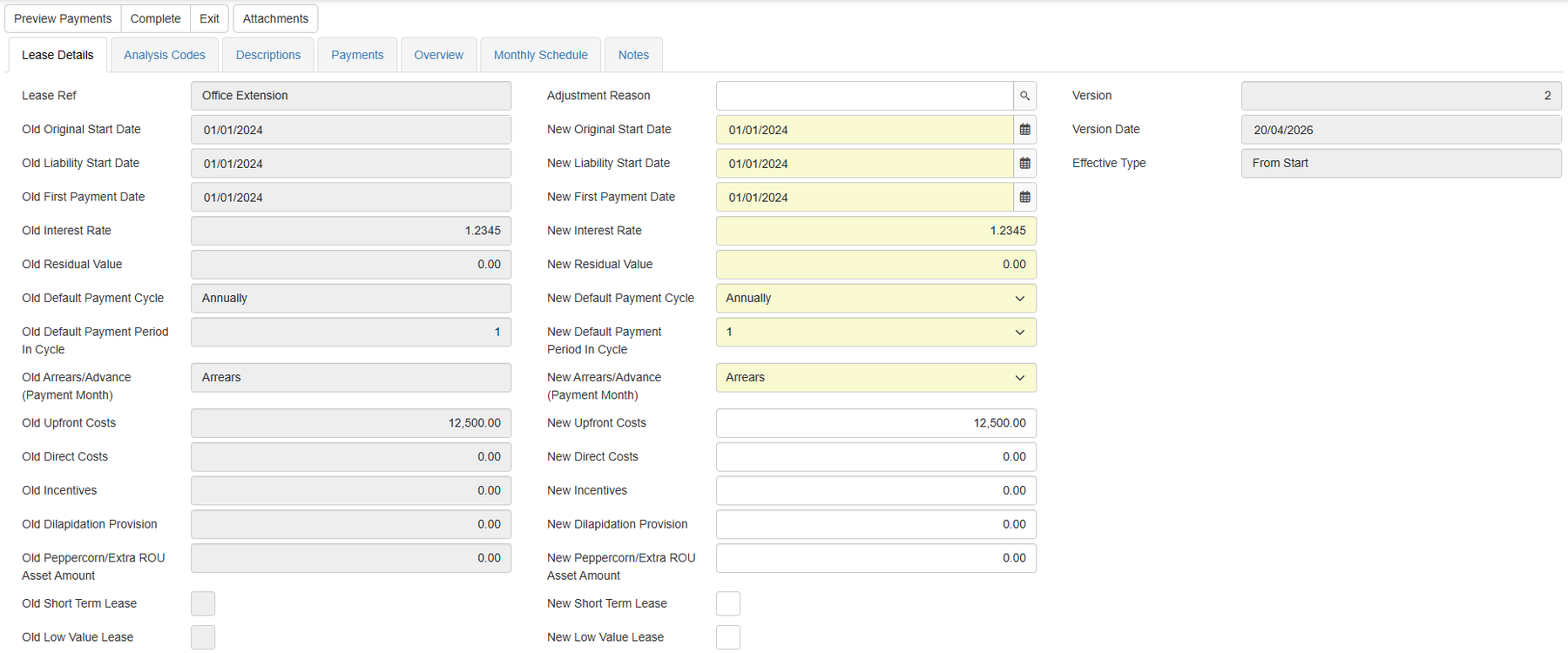
FMIS lease adjustment screen comparing existing and revised lease terms.

Compare existing and revised lease terms when processing an adjustment. Select the screenshot to enlarge it.

Review values and prepare postings

Check period values and generate postings using the agreed account mapping and posting rules. Review new leases, adjustments and terminations before completing the period.

Where FMIS Fixed Assets is used to manage linked right-of-use assets and depreciation, the implementation establishes the relationship between the modules and the processing sequence.

FMIS Trust and Security for Industry Sectors

Cloud or on-premise deployment

Choose a deployment approach that fits your hosting policies, IT resources and data residency requirements. FMIS Lease Accounting is available through FMIS Cloud or as an on-premise installation.

FMIS Cloud: UK-hosted deployment

Our UK-hosted cloud service uses UK data centres. Your IT team can review the proposed service, access arrangements and responsibilities with FMIS.

On-premise: deployment within your infrastructure

Install FMIS Lease Accounting within your organisation’s infrastructure where internal hosting is required. We agree the infrastructure, access and support requirements before implementation.

Security information for your IT review

FMIS holds ISO 27001, ISO 9001 and Cyber Essentials Plus certifications. Our Trust Centre provides information about security, cloud hosting, data protection and business continuity.

Visit the FMIS Trust Centre

Implementation, finance-system transfer and support

Configure the system around your reporting

FMIS implementation support covers requirements, setup, data imports, training and user acceptance testing. We agree company structures, reporting codes, accounting periods and required outputs with your team.

The scope should include how exemptions are recorded, who can amend key inputs and how period outputs are reviewed.

Work with your existing finance system

FMIS Lease Accounting provides specialist calculations and reporting alongside your existing accounting system. Postings can be exported to Excel, with account mapping and the transfer process agreed during scoping.

Where a specific interface or export format is required, we assess it against your finance system and include the necessary work in the proposal.

Train the people completing the work

Training covers maintaining records, processing changes, reviewing schedules and producing period outputs. The FMIS team provides ongoing support for technical and functional queries.

The implementation timetable depends on your data, portfolio complexity, deployment choice and integration requirements. We agree the schedule after reviewing these with you.

Lease records moving through data import, reconciliation and review.

Move your existing lease accounting into FMIS

The starting point depends on whether you are applying revised FRS 102 for the first time, replacing spreadsheets or moving from another system. We agree the records, dates and values to be loaded, then establish how your team will validate the results.

Prepare the information behind each lease

  • Lease references, company details and reporting codes.
  • Commencement dates, agreed lease terms and payment schedules.
  • Discount rates and the accounting inputs approved by your finance team.
  • Relevant payment changes, adjustments and terminations.
  • Existing balances and linked asset records, where applicable.

Agree and check the opening position

Before importing data, agree the reporting start date and how the opening liability and right-of-use asset values will be established. Include any relevant existing asset balances and adjustments in the implementation scope.

Compare imported records and calculated outputs with the agreed opening position before relying on the system for reporting. The approach should also identify which supporting information is retained outside FMIS.

FRS 102 guidance and related FMIS solutions

Use the guidance below to explore the accounting requirements alongside your software assessment.

If your requirements also include depreciation and wider asset accounting, explore FMIS Fixed Assets. We can explain the proposed module setup during your demonstration.

FRS 102 lease accounting software FAQs

Yes. FMIS includes an IFRS 16/FRS 102 accounting setting and supports lease records, liability and right-of-use asset calculations, adjustments, postings and reporting. Your implementation establishes the inputs, configuration and outputs required for your FRS 102 reporting.

FRS 102 does not require a particular software package. Dedicated software becomes useful when the volume of leases, recurring calculations and changes make spreadsheet processes difficult to maintain and review.

Yes. FMIS provides Excel templates for new leases, adjustments and terminations. Implementation establishes the data format, opening position and checks required before using the imported records for reporting.

Your finance team approves the accounting inputs, including discount rates and lease terms. FMIS uses the recorded inputs to calculate the schedule; it does not replace the judgement needed to select them.

FMIS reporting can include or exclude records identified as short-term or low-value leases. Your team determines whether the FRS 102 exemptions apply, and implementation establishes how those records and any related expense postings are handled.

Yes. FMIS supports payment and lease-term adjustments and early terminations, with retained versions for reviewing changes. Bring examples of your lease arrangements to the demonstration so we can show the relevant process.

Available outputs include lease schedules, period values, current and non-current liability information, future payments and reconciliation reports. We compare these with your required disclosures and identify any additional information your team needs to prepare.

FMIS Lease Accounting does not currently support multi-currency. If your lease portfolio includes more than one currency, discuss this with FMIS before selecting the software so we can assess suitability.

Compliance depends on complete records, appropriate accounting judgements, configuration and review. FMIS supports the work through calculations, reporting and controls; your finance team remains responsible for approving the accounting treatment.

Pricing depends on users, deployment and the agreed implementation scope, including migration, configuration, training and any interface work. Tell us your approximate lease count, company structure and finance system so we can prepare an itemised proposal.

See how FMIS would handle your FRS 102 leases

Discuss your lease portfolio, current accounting process and reporting requirements with the FMIS team. We can use a demonstration to review relevant workflows, show the available outputs and assess the implementation work.

To help us prepare, tell us approximately how many leases you manage, which accounting standard you report under and which finance system you use.

Please let us know a few details to set up your demo, including your approximate lease count, reporting framework and finance system in the additional information field. Alternatively, you can call us directly on +44 (0) 1227 773003 to arrange a time.

    Name *

    Organisation *

    Email *

    Phone *

    Additional information

    What do you require?

    We ask for a few details so we can send the right information and follow up appropriately.

    We do not pass your contact details outside FMIS.

    Choose a time

    FMIS has more than two decades of experience in delivering lease accounting software internationally. Schedule a call to talk through your requirements with one of our experienced consultants.

    Select a time using the calendar below to speak with a consultant. Alternatively, you can contact us here.

    • 10-20 minute call with an FMIS consultant.
    • You will receive Microsoft Teams call joining details via email after booking.

    Get a quote

    Include your approximate lease count, reporting framework and finance system in the additional information field. Complete the form below for a tailored quote for your organisation, or alternatively, call us on +44 (0) 1227 773003 to speak with one of the team.

      Name *

      Company *

      Email *

      Phone *

      How many user licences do you need?

      How many assets are you tracking?

      How many separate companies do you want to manage?

      Is there anything further you can tell us that will help us understand your requirements?

      Which FMIS products do you require?

      Please note that your estimated quote will include hosting, training, and set-up costs.

      For on-premise solutions, please reply to the email we send you or contact us directly.

      This quote is provided as an estimate based on the information available and may include certain assumptions. Please review the details carefully to ensure they reflect your requirements.

      Download a brochure

      Complete the form below to download an FMIS brochure, or alternatively, call us on +44 (0) 1227 773003 to speak with one of the team.

        First name*

        Last name*

        Job title*

        Company*

        Email address*

        Phone number

        Anything else we should know?

        What would you like information about?*


        We ask for a few details so we can send the right information and follow up appropriately. We use your details to respond to your enquiry. See our Privacy Policy.

        FMIS Lease Accounting version 12.47 product update

        What is new in FMIS Lease Accounting version 12.47

        FMIS Lease Accounting version 12.47 includes reporting and import performance improvements, together with additional support for defined data-conversion scenarios.
        G-Cloud 15 - Government Commercial Agency Supplier logo

        FMIS awarded G-Cloud 15 supplier status

        FMIS Asset Management Software awarded G-Cloud 15 Supplier Status for Fixed Asset Management, Lease Accounting, Asset Tracking & Equipment Maintenance software.
        Non-Current Assets vs Fixed Assets In the UK public-sector

        Why the UK Public Sector Is Moving from Fixed Assets to Non Current Assets

        Why is the UK public sector shifting to non-current assets, and how does FMIS software enhance control and compliance?
        Charities SORP 2026 lease accounting changes

        Preparing for Charities SORP Lease Accounting Changes 2026

        Charities SORP 2026 changes lease accounting and reporting. Understand the new requirements, revised thresholds and how FMIS supports finance teams.