Lease Accounting Software

FMIS Lease Accounting helps finance teams manage property, vehicle and equipment leases, calculate right-of-use assets and lease liabilities, and prepare postings and reports to support IFRS 16, ASC 842 and FRS 102 reporting.

Bring lease records, calculations and changes into one system, with cloud and on-premise deployment options.

Lease accounting software connecting property and equipment leases with accounting schedules and contract records.

Updated by: • Updated: October 12, 2026

Lease accounting software for finance teams

FMIS Lease Accounting gives accountants, finance managers and financial controllers one system for managing property, vehicle and equipment leases. It maintains lease records, calculates right-of-use assets and lease liabilities, and produces schedules, postings and reports to support IFRS 16, ASC 842 and FRS 102 reporting.

Your team can use it to manage new agreements, process changes and prepare month-end and year-end figures, reducing reliance on separate spreadsheets.

For accounting guidance, browse our lease accounting resources.

Support for IFRS 16, ASC 842 and FRS 102

FMIS lease accounting software helps finance teams apply IFRS 16, ASC 842 and revised FRS 102 requirements through centralised lease records, automated calculations and reporting. Reduce reliance on separate spreadsheets and make lease balances easier to review, reconcile and explain.

FRS 102 Lease Accounting Standard Icon

FRS 102 lease accounting

FMIS supports the revised FRS 102 lease requirements by centralising lease data, calculating right-of-use assets and lease liabilities, and maintaining an audit trail of changes.

IFRS 16 lease accounting standard logo

IFRS 16 lease accounting

FMIS calculates right-of-use assets and lease liabilities, processes lease changes, and produces schedules, reports and general ledger postings to support IFRS 16 reporting.

ASC 842 lease accounting standard logo

ASC 842 lease accounting

FMIS supports operating and finance lease accounting under ASC 842, including straight-line lease expense and right-of-use asset amortisation for operating leases.

How FMIS handles your lease accounting workflows

Import and maintain lease records

Create individual lease records or import agreements from Excel for initial migration and the ongoing addition of new leases.

Record lease terms, payment cycles and calculation inputs, including monthly, quarterly and annual payments made in advance or arrears.

Calculate liabilities and right-of-use assets

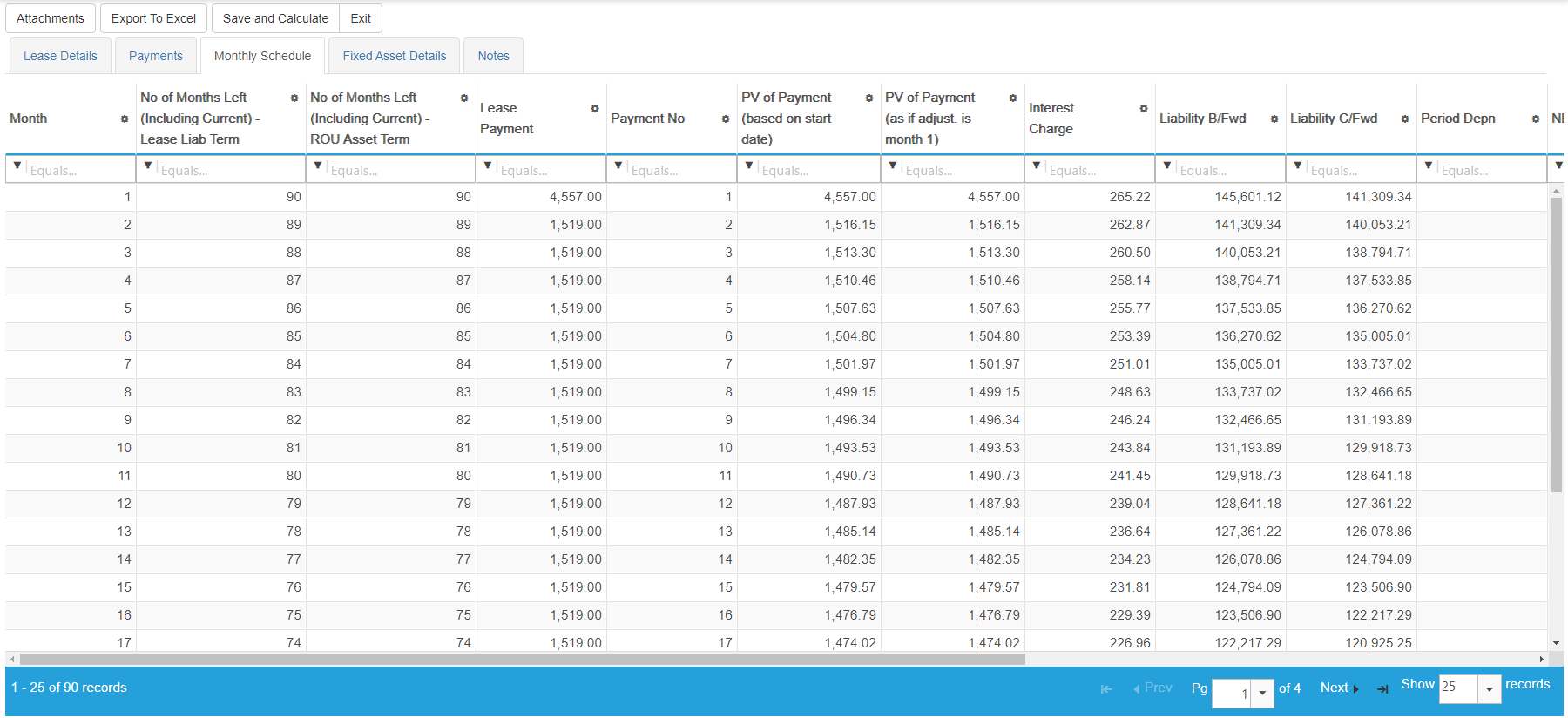
FMIS calculates lease liabilities and right-of-use asset values, with schedules showing payments, interest charges and liability balances across the lease term.

Your team determines the accounting inputs, including the lease term, discount rate and treatment of contract components.

FMIS monthly lease schedule showing payments, interest charges and opening and closing lease liability balances.
Review monthly payments, interest charges and opening and closing liability balances. Open the full-size screenshot in a new tab.

Process mid-term adjustments and early terminations

Process revised payments, changes to lease terms and early terminations, then review their effect on schedules and accounting values.

For example, record a payment change following a property rent review. Adjustments and terminations can also be imported for larger portfolios.

Review values and prepare postings

Check period totals and produce lease accounting postings for your finance system.

Review new leases, mid-term adjustments and early terminations before completing the period. Where corrections are required, amend records and re-run periods using the relevant controls.

Lease reporting and period controls

Understand your lease balances, review future payment commitments and complete each accounting period with a clear record of the figures. FMIS provides portfolio summaries and individual lease details to help your finance team reconcile results and answer reporting queries.

Find the detail behind your lease balances

Choose the report that fits the task, from reviewing the whole portfolio to checking an individual agreement:

  • Lease Summary: review an overview of your recorded lease portfolio.
  • Lease Details: examine the information held against individual agreements.
  • Future Payments: check payments scheduled beyond the current period.
  • Payments by Year: review scheduled payments across reporting years.
  • Reconciliation Report: full roll-forward reporting of movements in lease and right-of-use asset values for the selected year or period range.
  • Values by Year: aged analysis of key lease figures, with breakdowns across short, medium and long-term periods.

Use Excel and PDF outputs to support review, reconciliation and financial statement preparation. The standard reporting suite covers a wide range of lease accounting needs, with flexible selection and analysis options. Bespoke reports are rarely needed; any unusual reporting requirements can be assessed during scoping.

Control changes after period review

Once your team has reviewed the period’s outputs, close and lock the accounting period to control subsequent changes.

If a correction is required, re-open and reprocess the period in line with your organisation’s agreed finance procedures.

Handle information received after period close

Alternatively, new leases and mid-term adjustments can be backdated so their earlier effective date is recognised, with the accumulated impact posted in the current open month. Closed periods remain unaffected. This helps your team account for lease information received late without reopening completed periods.

Portfolio reports linked to individual lease records and a locked accounting period.

What our customers say


“FMIS offers the most comprehensive fixed asset management and leasing software we’ve seen for healthcare.”

“The system is very intuitive and user-friendly, covering all of our requirements. It also provides us with lease accounting for US and UK GAAP”

“Excellent summary and detailed reports with a user-friendly system.”

“I find it easy to use and most of all – I like the way you can pull reports by different criteria”

“The training gave us a clear and thorough introduction to the system, which made getting started much easier. ”

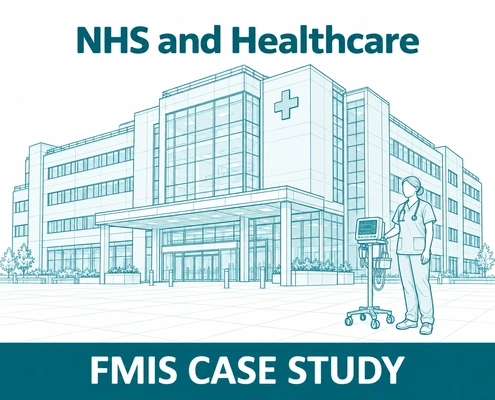
St Georges NHS Fixed Asset and Lease Accounting Case Study hero image

Lease accounting in practice: St George’s University Hospitals

St George’s University Hospitals NHS Foundation Trust added FMIS Lease Accounting in 2022 to support its IFRS 16 transition, building on its existing FMIS Fixed Assets system.

The implementation addressed a practical challenge: importing existing finance leases while retaining asset identifiers and linking records between the two modules. The approach was designed to avoid duplicate right-of-use assets, with specialist guidance on reconciling asset values and handling adjustments.

Read the St George’s fixed asset and lease accounting case study

Who uses lease accounting within your organisation?

Finance teams handle lease accounting, while senior management needs a clear view of commitments and financial impact. FMIS supports both through maintained lease records, accounting schedules and reporting.

Finance and accounting icon

Finance and accounting

Maintain lease records, review calculation inputs, process changes and prepare period postings and reports. Finance managers and financial controllers can review right-of-use assets and lease liabilities, reconcile balances and provide supporting information for audit queries.

Senior management reviewing lease reporting and commitments

Senior management

Use lease summaries and future payment reports to understand the organisation’s lease commitments. Finance directors and other senior decision-makers can review the financial impact of property, vehicle and equipment leases when considering budgets, renewals and future investment.

FMIS Trust and Security for Industry Sectors

Cloud or on-premise deployment

Choose a deployment approach that fits your organisation’s hosting policies, IT resources and data residency requirements. FMIS Lease Accounting is available through FMIS Cloud or as an on-premise installation.

FMIS Cloud: UK-hosted deployment

Use FMIS Lease Accounting through our cloud service, hosted in UK data centres. This option suits organisations seeking external hosting rather than running the application within their own infrastructure.

On-premise: deployment within your infrastructure

Install FMIS Lease Accounting within your organisation’s infrastructure where internal hosting is required. Your IT team can review the infrastructure, access and support requirements with FMIS before implementation.

We can help you compare the options against your integration needs, internal policies and responsibilities for maintaining the environment.

Security information for your IT review

FMIS holds ISO 27001, ISO 9001 and Cyber Essentials Plus certifications. Our Trust Centre provides supporting information about security, cloud hosting, data protection and business continuity to help your team assess the proposed service.

Visit the FMIS Trust Centre

Implementation, integration and support

Moving to lease accounting software requires an agreed approach to data, configuration and reporting. FMIS provides implementation support covering requirements, system setup, data imports, training and user acceptance testing.

Agree the scope and migration approach

Your team identifies the leases in scope. We work with you to agree the lease attributes to be held, the accounting framework, configuration and required outputs.

The migration approach should identify which records and balances need to be transferred, how they will be prepared, and how the results will be checked. This is particularly relevant when moving from existing spreadsheets or introducing a new reporting basis.

Work with your existing finance system

FMIS Lease Accounting can be used as a standalone application or alongside other FMIS solutions and existing accounting software.

The appropriate data exchange depends on your finance system and processes. During scoping, we establish the required posting format, account mapping and transfer method.

Train the people completing the work

Training covers the tasks your users need to perform, including maintaining records, processing changes, reviewing schedules and producing period outputs.

The FMIS team also provides ongoing support for technical and functional queries.

FMIS Software Implementation flow diagram

Lease accounting guidance and product updates

Lease Accounting Guide

Understand the principles behind lease recognition, right-of-use assets, lease liabilities and ongoing accounting.

Read the Lease Accounting Guide

All lease accounting resources

Browse the main guide, specialist FRS 102, IFRS 16 and ASC 842 guides, practical articles and relevant case studies.

Browse all lease accounting resources

FMIS Lease Accounting product updates

Read about reporting and import performance improvements and defined data-conversion scenarios in version 12.47.

Read the Lease Accounting version 12.47 update

Lease accounting software FAQs

FMIS Lease Accounting is designed for finance teams managing leases from the lessee’s perspective, including property, vehicle and equipment portfolios. It supports teams responsible for maintaining lease records, completing period calculations and preparing reporting outputs.

Yes. FMIS supports Excel imports for lease records, with import processes also available for adjustments and terminations.

The implementation process should establish the required data format and checks before records are loaded.

FMIS supports bulk imports and processing, reducing the need to maintain every lease individually. Portfolio size, reporting requirements and the proposed environment should form part of the initial assessment.

FMIS Lease Accounting provides specialist lease calculations, records and reporting. It can work alongside your existing accounting system, with lease postings transferred through an agreed process.

FMIS Lease Accounting does not currently support multi-currency. If your portfolio includes leases in different currencies, please raise this during the initial discussion so we can assess suitability.

Compliance depends on the completeness of your records, accounting judgements, configuration and review procedures.

FMIS supports the process through calculations, schedules, reporting and period controls. Your finance team remains responsible for applying the relevant standard and approving the resulting accounting treatment.

The timetable depends on the condition of your data, portfolio complexity, deployment choice and any integration requirements.

We agree the implementation scope and schedule after reviewing these requirements with your team.

Pricing depends on the required users, deployment option and implementation scope, including data migration, training and any integration work.

Contact FMIS

with an outline of your requirements so we can prepare a proposal.

See how FMIS would handle your lease portfolio

Discuss your accounting framework, lease portfolio and reporting requirements with the FMIS team.

We can use the demonstration to review relevant workflows, show the available outputs and identify any requirements that need further investigation.

To help us prepare, tell us approximately how many leases you manage, which accounting standard you report under and which finance system you use.

Please let us know a few details to set up your demo. Alternatively, you can call us directly on +44 (0) 1227 773003 to arrange a time.

To help us prepare a relevant demonstration, select Lease Accounting and tell us approximately how many leases you manage, your accounting framework and your finance system.

    Name *

    Organisation *

    Email *

    Phone *

    Additional information

    What do you require?

    We ask for a few details so we can send the right information and follow up appropriately.

    We do not pass your contact details outside FMIS.

    Choose a time

    Schedule a call to discuss your requirements with FMIS.

    Select a time using the calendar below to speak with a consultant. Alternatively, you can contact us here.

    • 10-20 minute call with an FMIS consultant.
    • You will receive Microsoft Teams call joining details via email after booking.

    Get a lease accounting quote

    Complete the form below for a tailored quote for your organisation, or alternatively, call us on +44 (0) 1227 773003 to speak with one of the team.

    Please include the approximate number of leases, your reporting framework and your existing finance system in the additional information field. Select Lease Accounting as the required product.

      Name *

      Company *

      Email *

      Phone *

      How many user licences do you need?

      How many assets are you tracking?

      How many separate companies do you want to manage?

      Is there anything further you can tell us that will help us understand your requirements?

      Which FMIS products do you require?

      Please note that your estimated quote will include hosting, training, and set-up costs.

      For on-premise solutions, please reply to the email we send you or contact us directly.

      This quote is provided as an estimate based on the information available and may include certain assumptions. Please review the details carefully to ensure they reflect your requirements.

      Download a brochure

      Select Lease Accounting in the form below to request the relevant FMIS brochure, or alternatively, call us on +44 (0) 1227 773003 to speak with one of the team.

        First name*

        Last name*

        Job title*

        Company*

        Email address*

        Phone number

        Anything else we should know?

        What would you like information about?*


        We ask for a few details so we can send the right information and follow up appropriately. We use your details to respond to your enquiry. See our Privacy Policy.