Multi-company and Multi-book Fixed Asset Accounting

FMIS provides multi-company and multi-book fixed asset accounting for finance teams managing local and group reporting. Maintain separate company records and parallel asset values for local and group reporting, with configurable depreciation and general ledger outputs. Explore the workflows below or arrange a demonstration around your company and book structure.

Business premises and a machine tool connected with parallel accounting panels.
Business premises, a machine tool and parallel ledger panels illustrating multi-company fixed asset accounting.

Updated by: • Updated: October 15, 2026

Fixed asset accounting for local and group finance

When subsidiaries use different accounting policies, currencies or financial calendars, a single set of asset values may not meet every reporting need. FMIS is designed for finance teams that need to maintain these differences within a structured fixed asset system.

  • Keep company asset records separate while giving authorised group users access across entities.
  • Maintain different financial values for the same asset, including local and group reporting books.
  • Run depreciation for selected companies and books, then prepare company or group asset reports.

Your existing finance system may already meet these needs. Specialist fixed asset software is worth evaluating where parallel values, reporting structures or period-end work require additional spreadsheets or repeated manual adjustments.

Explore FMIS Fixed Asset Management Software

How FMIS supports multi-company and multi-book fixed asset accounting

Configure the structure around the information your finance team needs to maintain and report. Your team determines the accounting policies, estimates and reporting basis for each book.

Three connected company buildings.

Separate company accounting

Maintain company-specific currencies, analysis codes, periods and depreciation rules. Assign user access to the companies each person needs, while enabling group finance to work across authorised entities.

Parallel accounting books with separate financial values.

Parallel reporting books

Hold different financial values for an asset in separate books, with book-specific depreciation methods, lives and residual values. The current version supports up to eight books within each company setup.

Separate reporting currency books and conversion.

Local and group currencies

Use books in different currencies, related-book settings and dated exchange rates to maintain the required values. Agree the conversion and reporting treatment during configuration.

What is the difference between a company, a book and a company group?

These elements serve different purposes. Setting them up correctly helps your team retain entity-level detail and produce meaningful reports across the organisation.

Company: whose assets are being accounted for?

A company separates a set of asset records, commonly for a legal entity. Each company can have its own currency, analysis codes, periods and depreciation rules. Analysis profiles, the structure of the coding fields, are shared across the system. A site or department can often be represented through analysis codes instead of a separate company.

Book: which financial treatment applies?

A book holds a particular set of financial values for an asset. Separate books can support local and group reporting, different currencies or an agreed statutory and tax treatment. They retain parallel accounting values without turning the same physical item into unrelated asset records.

For organisations reporting under IFRS, IAS 16 Property, Plant and Equipment sets out the accounting principles for these assets. Your finance team determines how the requirements apply to each reporting book.

Company group: which entities should a report include?

A company group brings selected companies together for reporting. Main reports can combine their asset totals or present each company separately. A group selection respects user access: companies a user cannot access are excluded from the output. Combined asset reporting is not a replacement for full group financial consolidation.

From parallel book values to a reviewed period end

1. Configure the companies and reporting books

Agree the company structure, currencies, calendars and book purposes. Set depreciation defaults by book and asset category, including method, useful life and residual value. Defaults can be overridden when an asset is created; changing a default does not retrospectively change existing assets.

2. Maintain and inspect each asset’s values

Create or import the asset with its required book details. Review the Book Details screen and the values held for each book and period. A local book and a group book can apply different estimates while retaining the connection to the underlying asset.

FMIS Book Details showing separate Local GAAP and TAX books for one asset.
Book details for one demonstration asset, showing separate Local GAAP and TAX books. This is a screen example, not a statement of tax calculation coverage. Open the full-size screenshot in a new tab.

One asset, two accounting estimates

For illustration, a machine costing £120,000 with zero residual value would have an annual straight-line charge of £24,000 over five years or £15,000 over eight years. Both figures assume a full year with no other movements. These are illustrative estimates, not prescribed lives under an accounting standard. FMIS books retain the configured treatment for the asset.

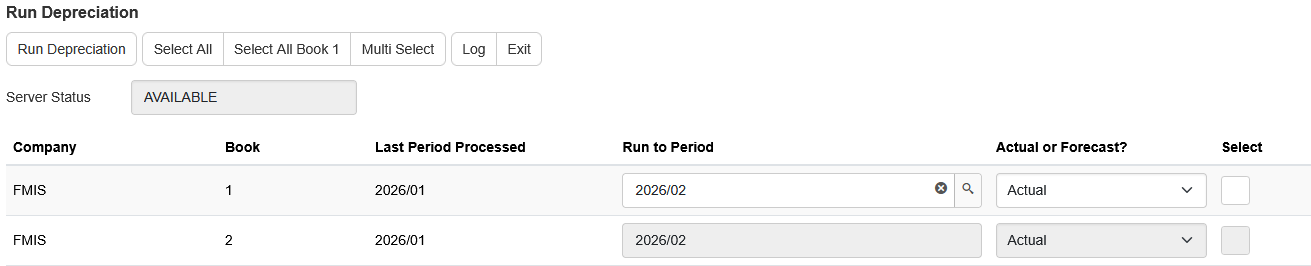
3. Run depreciation for the selected companies and books

The Run Depreciation screen lists the companies you can access and their books, together with the last processed period. Choose the combinations and periods to run. Multi Select helps select multiple books or a company group for review before processing. Periods can be configured for monthly, four/five-week, quarterly or annual reporting.

FMIS Run Depreciation showing company, book, last processed period and the next period to run.
Select the company and book combinations to process, then review the period selection. Example from the FMIS Fixed Assets user guide using demonstration data. Open the full-size screenshot in a new tab.

4. Review the results and prepare ledger outputs

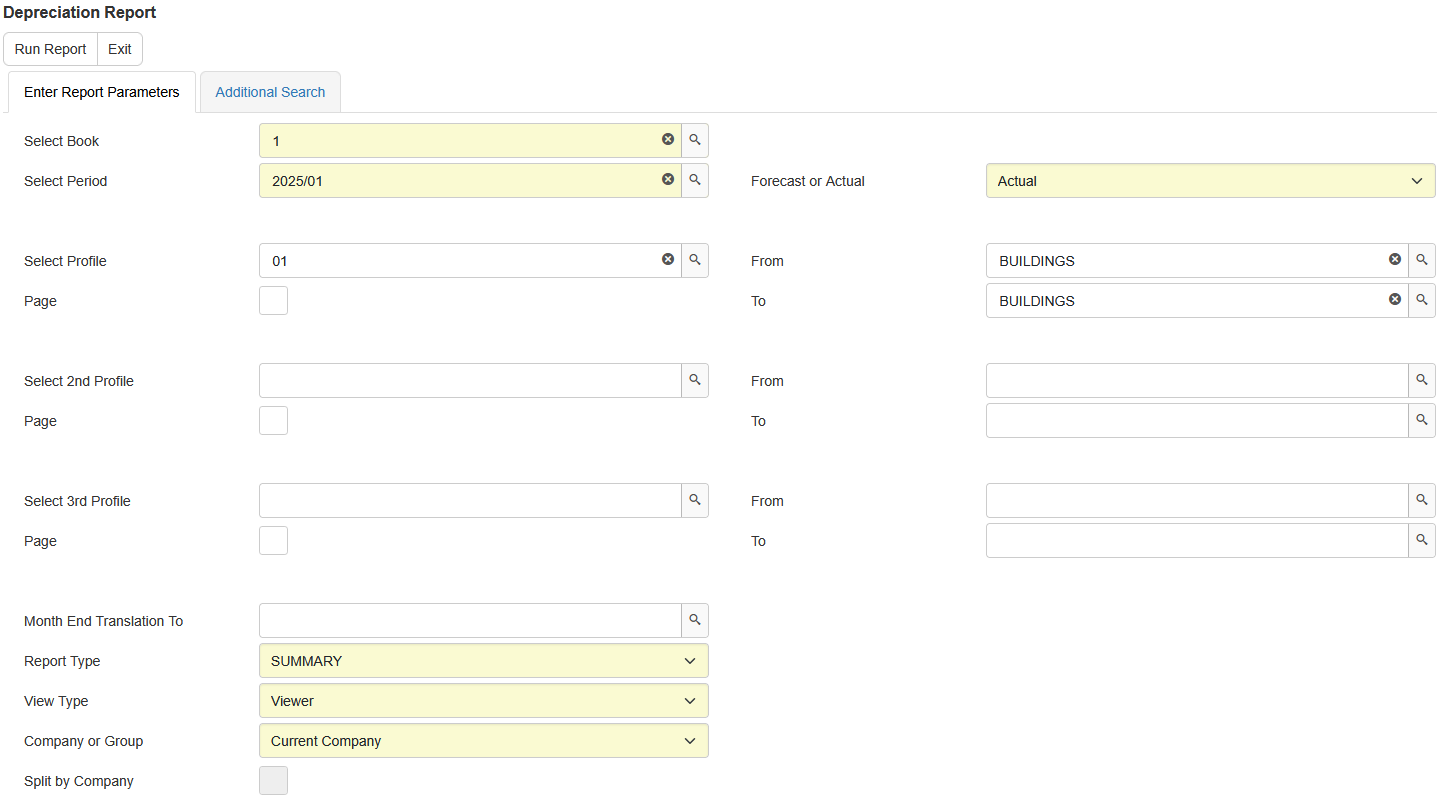
Run company or group reports using the appropriate book, reporting dates and currency basis. Explain the movements, check the selected population and generate postings using the configured general ledger rules. Reconcile the output with the destination finance system through your agreed transfer process.

Company and group asset reporting

Use the reporting book and company selection that match the question being answered. Main reports can combine assets across a company group or split the presentation by company. Check that book purposes, reporting dates and currency treatments are suitable before interpreting the totals.

Reporting tasks and relevant FMIS outputs
Reporting task FMIS output or process
Review asset values and depreciation Depreciation Report and Asset Register Report, with book, period, company/group and analysis selections.
Present company results within a group Company-group selection on main reports. Use Split by Company for separate company presentation and a grand total, or combine the asset population.
Explain opening balances and movements Summary and Detailed Reconciliation Reports for cost, depreciation and asset movements. Agree the book and period basis for the review.
Review values over a period range Period Range Summary for selected periods and the configured actual/forecast basis.
Review period-end currency amounts Currency Revaluation Report for a configured group currency book. Agree exchange rates, the reporting basis and any subsequent adjustments or postings separately.
Prepare the finance-system transfer Configured general ledger rules and account mappings, with Excel or CSV posting output. A direct interface depends on the destination system and agreed scope.
FMIS Depreciation Report parameters including Company or Group and Split by Company.
Choose a company or company group, reporting book, period and presentation. Example parameters from the FMIS user guide; dates and selections are illustrative. Open the full-size screenshot in a new tab.

Keep the entity and book basis clear

Reports should identify the company population, book and period being reviewed. Different local treatments or currencies need an agreed basis before values are combined. Your finance team determines any consolidation adjustments, eliminations and disclosures required outside the fixed asset reporting process.

For IFRS reporting, see the IFRS Foundation’s IAS 21 overview on foreign currency transactions and translation. Agree the required currency basis before configuring books and reporting outputs.

Review processing status and access

Depreciation is selected by company, book and period, and creates period value records used in reports and enquiries. FMIS distinguishes processed periods from closed periods. Company permissions control the records available to a user; group-report selections do not override those restrictions.

Transfer assets between companies with the required checks

FMIS supports full inter-company asset transfers where the sending and receiving companies have similar book structures. The asset identifier is retained, and depreciation for the transfer period is charged to the receiving company. Review the receiving codes, invoice timing and ledger treatment. The documented process permits one inter-company transfer per asset per period; partial transfers and splits are not part of that process.

Company premises and parallel ledger panels illustrating group asset reporting.
A machine tool and company buildings beneath parallel ledger panels.

Customer experience: international group asset accounting

Doncasters

Doncasters needed to bring together fixed asset information across an international manufacturing group with multiple companies, currencies and general ledger systems. Separate spreadsheets had made it difficult to maintain a consistent view of the asset information.

The published case study describes how FMIS supported its multi-site, multi-national and multi-book requirements, bringing records together and improving reporting and access to asset information. It provides a practical example of specialist fixed asset accounting alongside an existing finance environment.

Read the Doncasters fixed asset management case study

Illustrative precision manufacturing facility with a machining centre and engineered components.

Implement the company and book structure around your first close

Implementation begins with the entity structure and the figures each book needs to hold. Agree a migration date, opening position and reporting requirements before preparing the import.

Prepare the records and accounting inputs

Your team supplies the asset population, accounting policies and opening values. FMIS helps agree the configuration, import format and required outputs.

  • Companies, reporting books, currencies, calendars and analysis codes.
  • Asset references, acquisition costs, accumulated depreciation, net book values, useful lives and residual values for the required books.
  • Exchange rates, user/company access, finance-system account mappings and required historic information.

Reconcile the starting position by company and book

Load representative records and compare cost, accumulated depreciation and net book value with the source register and ledger. Test different book treatments and reporting periods, investigate differences and confirm the opening position before relying on live results.

Test the process and train the team

Test company access, asset changes, selected depreciation runs, group reports and posting outputs. Include a representative transfer and currency scenario where relevant. Training should cover the people maintaining local records and those reviewing group figures.

Agree how postings reach each finance system

Configure general ledger rules and account-code derivation for the required company/book outputs. Agree the file format, transfer method and reconciliation responsibilities for each destination system. FMIS can generate Excel or CSV posting files; a direct interface is scoped separately. Check existing entries so that depreciation or asset movements are not posted twice.

Implementation workflow: prepare records, map and import the asset register, then check reports and journals.

Plan the first reporting cycle

Allow time for data preparation, opening-value checks and user testing. The timetable depends on the companies, books, source data and integration work, together with your team’s availability. Multi-company operation and the included company licences are defined in the proposal.

Cloud or on-premise deployment

FMIS Fixed Assets is available through FMIS Cloud or installation within your own infrastructure. Agree hosting, access and data residency requirements alongside the finance processes.

FMIS Cloud

For the UK-hosted service, data is held in UK data centres. Discuss user access, backups, recovery and service responsibilities when scoping the deployment.

Your own environment

An on-premise installation is available where internal hosting is required. Agree infrastructure, operational responsibilities and support arrangements with your IT team.

Information for your IT and procurement teams

FMIS holds ISO 27001, ISO 9001 and Cyber Essentials Plus certifications. The Trust Centre provides information to support IT, security and procurement review.

Visit the FMIS Trust Centre

Server cabinets protected by a shield beneath a cloud.

Multi-company and multi-book Fixed Asset Accounting Software FAQs

The current version supports up to eight books within each company setup. Books can hold different financial values or currencies for the same asset. Agree the structure during scoping, including which treatments and reporting currencies require separate books.

Companies can have their own periods, and books have year-end settings. Monthly, four/five-week, quarterly and annual period structures can be configured. Agree how the required local periods relate to group reporting dates and test the resulting outputs.

Yes. User access is granted by company. Processing screens list the companies the user can access, and group reports omit restricted companies. Agree local and group responsibilities when setting up permissions.

Yes. Selected setup sections can be copied from one company to another. This can reduce repeated configuration for a new entity with similar requirements. Review the copied currency, periods, codes and rules before loading assets.

No. Related-book currency conversion and period-end currency reporting are separate settings and processes. Agree the initial conversion rate, reporting currency and any month-end requirement. Test the required report and any resulting adjustments or postings during implementation.

FMIS can report fixed assets across a company group, either as combined asset totals or split by company. This does not replace a full financial consolidation system. Group eliminations, wider financial statements and other consolidation adjustments remain part of your finance reporting process.

FMIS supports full inter-company transfers where both companies have similar book structures. The asset identifier is retained and transfer-period depreciation is charged to the receiving company. Review the receiving codes, invoice dates and accounting entries. Partial transfers require a separately agreed approach.

No. Book accounting and tax treatment are separate requirements. FMIS supports parallel books and configurable depreciation, but the tax methods, law updates, capital-allowance treatment and filing outputs you require must be confirmed specifically. Multi-book capability alone does not establish tax compliance.

Yes. Agree the import format, company/book mapping and migration date, then prepare the asset data and opening values. Reconcile each company and book and test representative calculations and reports before the first live close. Data cleansing and historical conversion are scoped during implementation.

The proposal reflects company licences, users, asset volumes, deployment, modules and implementation services. Migration, configuration, training and finance-system interfaces also affect the scope. Provide your company and reporting requirements so FMIS can set out the inclusions clearly.

See how FMIS would handle your companies and reporting books

Arrange a demonstration around a representative asset, its local and group treatments, a depreciation run and the resulting reports. Tell us your approximate asset and company numbers, required books and currencies, financial calendars, existing finance systems and target reporting date.

Please let us know a few details to set up your demo. Alternatively, call +44 (0) 1227 773003.

Select Fixed Asset Accounting and describe your companies, reporting books, currencies and existing finance systems so we can prepare a relevant demonstration.

    Name *

    Organisation *

    Email *

    Phone *

    Additional information

    What do you require?

    We ask for a few details so we can send the right information and follow up appropriately.

    We do not pass your contact details outside FMIS.

    Choose a time

    Schedule a call to discuss your company structure, reporting books and implementation requirements.

    Select a time using the calendar below to speak with a consultant. Alternatively, you can contact us here.

    • 10-20 minute call with an FMIS consultant.
    • You will receive Microsoft Teams call joining details via email after booking.

    Get a quote

    Complete the form below for a quote for your organisation, or call +44 (0) 1227 773003.

    Select Fixed Asset Accounting. Include asset and user numbers, companies, reporting books, currencies, deployment preference and any migration or interface work.

      Name *

      Company *

      Email *

      Phone *

      How many user licences do you need?

      How many assets are you tracking?

      How many separate companies do you want to manage?

      Is there anything further you can tell us that will help us understand your requirements?

      Which FMIS products do you require?

      Please note that your estimated quote will include hosting, training, and set-up costs.

      For on-premise solutions, please reply to the email we send you or contact us directly.

      This quote is provided as an estimate based on the information available and may include certain assumptions. Please review the details carefully to ensure they reflect your requirements.

      Download a brochure

      Select Fixed Asset Accounting to request the relevant brochure. Mention any particular company, book or currency requirements in your message.

        First name*

        Last name*

        Job title*

        Company*

        Email address*

        Phone number

        Anything else we should know?

        What would you like information about?*


        We ask for a few details so we can send the right information and follow up appropriately. We use your details to respond to your enquiry. See our Privacy Policy.