Fixed Asset Management Software

FMIS provides fixed asset accounting software for finance teams managing asset registers, depreciation and financial reporting.

Maintain asset records, calculate depreciation across companies, books and currencies, and generate reports and general ledger postings from one system.

Building, plant, vehicle and IT assets connected to a central financial asset register.
Building, plant, vehicle and IT assets connected to a financial asset register.

Updated by: • Updated: October 15, 2026

Fixed asset accounting for finance teams

When asset records sit across spreadsheets or several finance systems, it can be difficult to explain balances, maintain different reporting values and keep calculations consistent. FMIS brings the financial asset register and its accounting history together.

Use FMIS alongside your accounting or ERP system when you need specialist depreciation, component structures, multiple reporting books or detailed asset movements. Configure analysis codes, periods and reports around your organisation’s accounting requirements.

Browse FMIS resources

Fixed asset software for your reporting requirements

Start with the workflows your finance team needs to manage. FMIS supports the register, calculations and outputs behind day-to-day fixed asset accounting.

Building and equipment beside financial asset schedules.

Depreciation and forecasting

Apply depreciation methods, useful lives, residual values and accounting periods. Review period charges and forecast depreciation using existing assets and, where required, planned expenditure.

Several companies connected to separate accounting books.

Companies, books and currencies

Maintain parallel asset values for different reporting purposes, including local and group books. Manage companies and currencies without relying on a separate spreadsheet for each treatment.

Financial reports examined alongside an asset record.

Reporting and audit trails

Explain opening balances, asset movements and closing values. Generate reports, investigate general ledger posting totals and review changes to main asset records.

Manage the financial asset lifecycle in FMIS

1. Build and maintain the register

Create or import records with acquisition costs, dates, asset categories and analysis codes. Use parent and sub-asset relationships to record components with different useful lives, while retaining a view of the overall asset.

2. Calculate and review depreciation

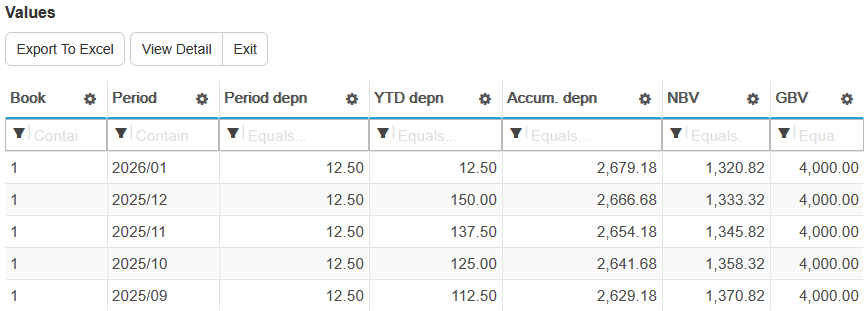
Apply methods such as straight line or reducing balance, together with the relevant life and residual value. Run depreciation for selected companies, books and periods, then review the charges and resulting book values. Forecasts can include budget assets without changing actual values or postings.

FMIS asset values screen showing period depreciation, year-to-date depreciation, accumulated depreciation, net book value and gross book value.
Review an asset’s depreciation and book values by period. Example from the FMIS Fixed Assets user guide, using demonstration data. Open the full-size screenshot in a new tab.

3. Record changes throughout the asset’s life

Record additional costs, transfers, changes in useful life, revaluations, impairments and full or partial disposals as required by your accounting policies. For assets under construction, configure the accounting transition when an asset becomes available for use. The permitted treatment depends on your reporting framework.

4. Explain movements at period end

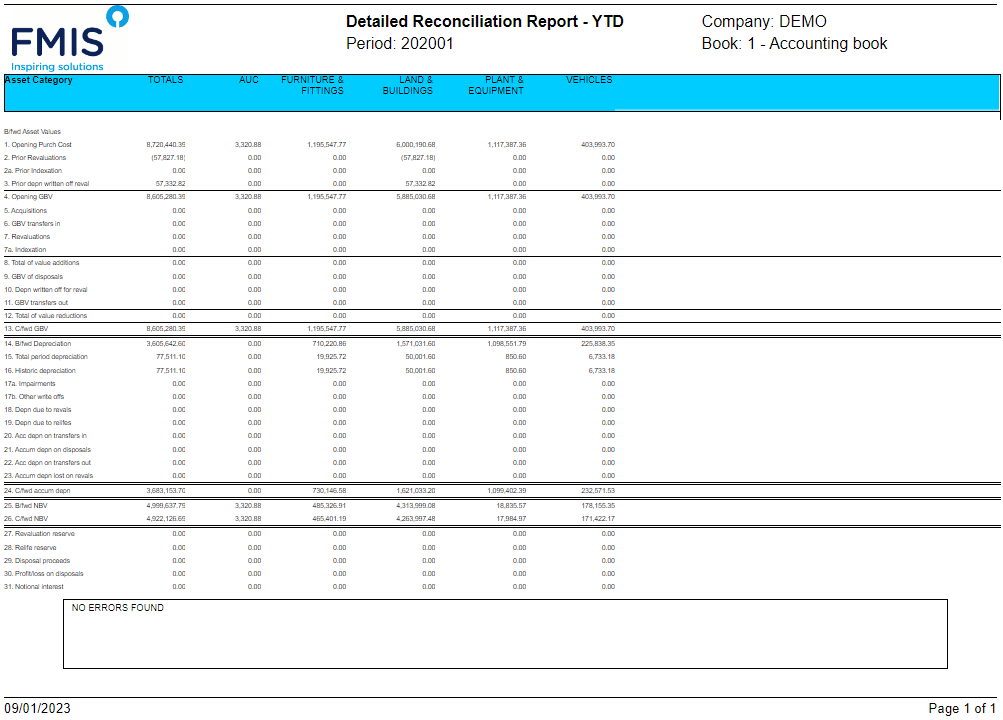
Run reconciliation reports to explain changes between opening and closing balances. Review additions, disposals, depreciation and other movements before generating journals. Your team checks the results and reconciles transferred postings with the finance system.

FMIS Detailed Reconciliation Report showing opening values, financial movements and closing asset values by category for company DEMO.
Explain movements in cost, depreciation and net book value by asset category. Demonstration report from the FMIS user guide; the displayed period is illustrative. Open the full-size screenshot in a new tab.

Reports that explain your fixed asset figures

Finance teams need to see how a balance was reached, whether they are preparing a management report, completing a close or answering an audit query. FMIS provides named reports and transaction detail to support that review.

Review balances, movements and postings

  • Depreciation and asset register reports: Review asset costs, depreciation and book values, with summary or detailed views and analysis-code selections.
  • Summary and Detailed Reconciliation Reports: Explain opening balances, movements and closing balances for cost and depreciation. Use the detailed report for further financial movements such as revaluations and life changes.
  • G/L Posting Reconciliation: Investigate how journal totals were built up, with asset-level detail behind summarised posting values.

Use PDF and Excel options for supported reports, and Excel or CSV for posting exports. Main reports can be run for company groups, with combined asset totals or separate company presentation, subject to user access.

Keep the detail behind the figures

Transaction reports show asset events such as transfers, disposals and adjustments. The Audit Log records changes to main asset and user data, with filters for dates, users, events and actions. In Tray entries and amendments are outside that log. Your finance team remains responsible for accounting policies, review and approval of the resulting figures.

Maintain parallel reporting values

Use separate books for different asset reporting requirements, including local and group values or different currencies. The current version supports up to eight books. Combined asset reporting is available; it is not a replacement for a full group financial consolidation system.

Support your accounting policies

For IFRS reporting, discuss the records and outputs needed for IAS 16 property, plant and equipment. For UK and Ireland reporting, consider the relevant FRS 102 requirements, including Section 17. For US GAAP reporting, agree the required book treatment and reports separately from tax depreciation.

FMIS supports the process through configurable calculations, separate books and financial records. Your team determines the accounting policies, estimates and judgements. See the IFRS Foundation’s IAS 16 information, the FRC’s FRS 102 information and FASB’s US GAAP standards information.

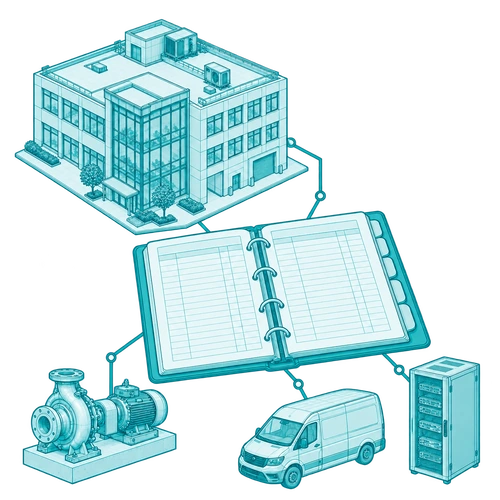
Financial report sheets linked to an industrial asset, with a magnifier showing the underlying equipment.
Industrial assets linked to financial reports and an individual equipment record.

What our customers say

The FMIS system has been one of the most user-friendly systems I have ever used.

The support received both during and post-implementation has been excellent.

Fixed asset accounting in practice: Doncasters

Doncasters needed to bring together fixed asset information held in multiple spreadsheets across an international manufacturing group, with different companies, currencies and general ledger systems.

The published case study describes how FMIS supported its multi-site, multi-company and multi-book requirements, bringing records together and improving reporting and access to asset information. It is a practical example of specialist fixed asset accounting alongside an existing finance environment.

Read the Doncasters fixed asset management case study

Illustrative precision manufacturing facility with a machining centre and engineered components.

Who uses FMIS Fixed Assets?

The software supports the people maintaining the register and those reviewing its financial outputs.

Finance and accounting team.

Finance and accounting teams

Maintain records, process asset changes, calculate depreciation and prepare period-end reports and postings. Financial controllers can review the movements and supporting detail behind reported balances.

Senior management.

Senior management and group finance

Review asset values and forecast charges across companies and reporting books. Use consistent asset reporting to inform budgets, investment discussions and management review.

Cloud or on-premise deployment

Choose FMIS Cloud or installation within your own infrastructure. Review hosting, access and data residency requirements alongside the proposed finance processes.

FMIS Cloud

The UK-hosted service uses UK data centres. Discuss access arrangements, service responsibilities, backups and recovery requirements with FMIS when scoping the deployment. Raise any different data residency requirement during that discussion.

On-premise installation

Install FMIS within your organisation’s infrastructure where internal hosting is required. Agree the technical requirements, operational responsibilities and support arrangements with your IT team before implementation.

Security information for your IT review

FMIS holds ISO 27001, ISO 9001 and Cyber Essentials Plus certifications. The Trust Centre provides information about controlled access, multi-factor authentication, encryption, testing and business continuity to support your supplier review.

Visit the FMIS Trust Centre

Server cabinets protected by a shield beneath a cloud.

Implementation, integration and support

Implementation is planned around your existing register, reporting requirements and first close in FMIS. The work includes agreeing the configuration, preparing data, checking opening values and training the team.

Agree the scope and migration approach

Agree a migration date, asset coding, company and book structure, and required history. Prepare acquisition costs, accumulated depreciation, net book values, dates and useful lives. Import test records, compare the calculations with your opening position and investigate differences before go-live.

Work with your existing systems

FMIS generates configurable general ledger postings, with Excel or CSV output available. A direct interface depends on the destination system and agreed scope. Agree account mappings, file formats, transfer steps and reconciliation responsibilities; do not assume that a named finance system has a standard live connector.

Train and support your users

Training covers maintaining records, processing changes, running depreciation and reviewing reports. Agree the people involved, implementation timetable and ongoing functional and technical support in the proposal. Timing depends on data preparation, configuration, testing and your team’s availability.

Implementation workflow: prepare records, map and import the asset register, then check reports and journals.

Fixed asset guides and software selection

Fixed asset registers

Understand the information, responsibilities and controls behind a financial asset register.

Read the fixed asset register guide

Choosing fixed asset software

Consider the requirements and supplier questions to cover when evaluating an asset management system.

Read the software selection guide

Depreciation methods for UK businesses

Review common depreciation methods and their practical application. This guide has a UK focus.

Read the UK depreciation methods guide

Fixed asset software: buying questions

Your ERP module may meet your requirements. Specialist software is worth evaluating when you need different reporting books, complex asset structures, depreciation configuration or outputs that are difficult to maintain in your current system. A demonstration should test those specific requirements.

Yes. Agree the data fields, migration date and opening values, then prepare and import the records using an agreed format. Check cost, accumulated depreciation and net book value, and test the resulting calculations. Any historic conversion or cleansing work is agreed within the implementation scope.

Yes. Fixed Assets supports multiple companies, books and currencies. Separate books hold different financial values for an asset, for example for local and group reporting. The current version supports up to eight books; confirm the structure required for your organisation.

FMIS provides specialist fixed asset records, calculations and reporting alongside your finance system. It generates general ledger postings that can be exported or transferred through an agreed interface. The transfer method and controls depend on the destination system and implementation scope.

FMIS provides configurable asset records, depreciation, books and reports to support your accounting policies. Discuss the required framework and specific outputs with the team. Book accounting and tax depreciation are separate requirements; any required tax methods or filing outputs need to be confirmed during scoping.

Fixed Assets covers the financial asset register and accounting workflows described here. Physical tracking, mobile scanning and lease-specific calculations may require additional modules or an agreed configuration. The proposal will identify the products and services included.

The timetable depends on the condition of the source data, companies and books, configuration, integration work and your team’s availability. We agree the scope and schedule after reviewing your requirements, allowing time for data checks, testing and training.

Pricing depends on the proposed users and asset volume, deployment option, modules and implementation services, including migration, configuration, training and any interface work. Tell us about your register and reporting requirements so we can prepare a quotation that sets out the inclusions.

See how FMIS would handle your asset register

Use a demonstration to review the workflows that matter to your finance team: maintaining records, running depreciation, managing different books and explaining period-end movements.

Tell us approximately how many assets and companies you manage, your reporting books and currencies, and which finance system you use. Include any required migration date or particular reporting challenge.

Please let us know a few details to set up your demo. Alternatively, call +44 (0) 1227 773003.

Select Fixed Asset Accounting and tell us about your asset register, companies, reporting books and existing finance system so we can prepare a relevant demonstration.

    Name *

    Organisation *

    Email *

    Phone *

    Additional information

    What do you require?

    We ask for a few details so we can send the right information and follow up appropriately.

    We do not pass your contact details outside FMIS.

    Choose a time

    Schedule a call to discuss your requirements with FMIS.

    Select a time using the calendar below to speak with a consultant. Alternatively, you can contact us here.

    • 10-20 minute call with an FMIS consultant.
    • You will receive Microsoft Teams call joining details via email after booking.

    Get a fixed asset accounting quote

    Complete the form below for a quote for your organisation, or call +44 (0) 1227 773003.

    Select Fixed Asset Accounting. Include your approximate asset and user numbers, companies, reporting requirements, preferred deployment and any migration or integration work.

      Name *

      Company *

      Email *

      Phone *

      How many user licences do you need?

      How many assets are you tracking?

      How many separate companies do you want to manage?

      Is there anything further you can tell us that will help us understand your requirements?

      Which FMIS products do you require?

      Please note that your estimated quote will include hosting, training, and set-up costs.

      For on-premise solutions, please reply to the email we send you or contact us directly.

      This quote is provided as an estimate based on the information available and may include certain assumptions. Please review the details carefully to ensure they reflect your requirements.

      Download a brochure

      Select Fixed Asset Accounting to request the relevant brochure. If you are also considering physical tracking or lease accounting, mention those requirements in your message.

        First name*

        Last name*

        Job title*

        Company*

        Email address*

        Phone number

        Anything else we should know?

        What would you like information about?*


        We ask for a few details so we can send the right information and follow up appropriately. We use your details to respond to your enquiry. See our Privacy Policy.