Written by: John de Robeck • Published: May 14, 2014 • Updated: March 10, 2026
The latest version of FMIS Fixed Assets software, v11, has now released. It brings with it significant improvements in many areas, especially for high volume users and those who want to see even more detailed reconciliation reports on their fixed assets at year end.
Many of our clients have already upgraded to the latest version free of charge, but if you are still running an older version, upgrading is normally quick and easy and most importantly free. For more information, or to request an upgrade to FMIS Fixed Assets v11, simply contact us using the form below or via the support page.
Not yet using FMIS Fixed Assets?
If you don’t currently use FMIS Fixed Assets software, you may be interested to know that we offer free upgrades to all our clients. Whenever we make an improvement, we offer it free to all our clients. To find out more about FMIS Fixed Assets, have a look at our product page or get in touch with us directly.
https://www.fmis.co.uk/wp-content/uploads/2014/05/v11-495x400-e1400148115728.jpg400495John de Robeckhttps://www.fmis.co.uk/wp-content/uploads/2026/04/FMISNavyTeal-1-150x80-1.webpJohn de Robeck2014-05-14 15:28:242026-03-10 11:14:30Fixed Assets v11 release
A world class university in the north of England needed to track the short term loans of specialist research equipment. Find out how they did it with FMIS Equipment and Maintenance.
https://www.fmis.co.uk/wp-content/uploads/2014/07/Equipment-and-Processing-Generic-495x400-v2.jpg400495John de Robeckhttps://www.fmis.co.uk/wp-content/uploads/2026/04/FMISNavyTeal-1-150x80-1.webpJohn de Robeck2014-05-13 16:37:282026-05-28 17:12:36Equipment and Maintenance case study
Written by: John de Robeck • Published: May 13, 2014 • Updated: March 10, 2026
The customer, a comprehensive professional services firm providing design solutions to private and public sector clients, required an efficient sales order processing system integrating with Deltek Vision. Key requirements included: billing interface with Vision, accounts payable interface via invoice matching, strong control over product item master records, including complex bill of material assembly.
Sales Order Processing
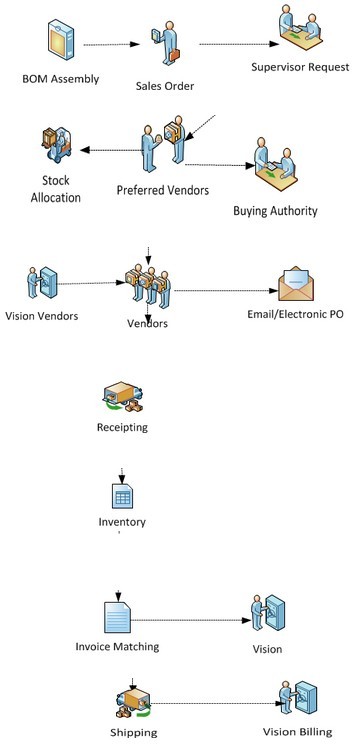
Sales Order Processing flow chart
The sales order can be made up of many combinations of assemblies, items and services. As a user constructs the sales order the system provides real time control over margins and build specifications. The system allowed an easy set up of all required parts and a straight forward authorisation trail.
Fulfilment: purchase or stock
The purchase order will be automatically routed to the preferred vendor for the associated items within the bill of assembly. Vendor selection can be overridden on the sales order if required. The user can also select the item to come from stock, selecting a specific batch quantity or serial number to be added to the packing list. Any final purchase orders will be emailed to the vendor once any authorisation has been completed.
Purchasing
Vendors receive the purchase order by mail or by email. A system alert manager monitors the progress of the purchase against the required delivery dates. Purchase order amendments can be raised at any time. Utility bills and other contracted costs can also be entered as purchase contracts.
Goods receipt
Each category of product has its own set of attributes to be used when recording the eventual receipt of the goods or service. Any serialised item can have make, model, year of manufacture, serial number or any other items captured by electronic entry, manual entry or through the punch-out service.
Equipment and inventory
Any IT equipment is logged into the physical asset register passing on all of the prior information collated to date. The Equipment system allows for asset tracking and automatic reconciliation with the Fixed Asset register.
Invoice matching
Vendor invoices can now be easily matched (two, three or four-way) against the system. The batch of vendor invoices are automatically generated into the Vision Accounts Payable system. Any variances, subject to route and category limits, will automate the production of a new purchase order change request.
Shipping/billing
All part/full shipments will generate a billing entry in Vision with the correct sales order references, quantity and values. Shipping documents can be formatted and templated by the system.
https://www.fmis.co.uk/wp-content/uploads/2014/05/Sales-Order-Processing-495x4001.jpg400495John de Robeckhttps://www.fmis.co.uk/wp-content/uploads/2026/04/FMISNavyTeal-1-150x80-1.webpJohn de Robeck2014-05-13 15:15:002026-03-10 11:14:55Sales Order Processing case study
https://www.fmis.co.uk/wp-content/uploads/2014/05/NHS-Bristol-Case-Study-495x4001.jpg400495John de Robeckhttps://www.fmis.co.uk/wp-content/uploads/2026/04/FMISNavyTeal-1-150x80-1.webpJohn de Robeck2014-05-02 15:24:032026-05-28 17:11:22Barcoding in hospitals: Bristol NHS trust uses FMIS software