FMIS Software
  • Home
  • Solutions
    • Fixed Asset Management Systems
      • Capital Projects
      • Enterprise Asset Management
      • Fixed Asset Management Software
    • Asset Tracking
      • Barcode Tracking
      • FMIS Mobile Asset Manager
    • Purchase to Pay
      • Purchase Order Processing
      • Sales Order Processing
    • Stock and Inventory
      • Kitting and Assembly
      • Material Requirements Planning (MRP)
      • Production Control
    • Equipment Maintenance
      • Field Service Management
    • Lease Accounting
      • Order Management
  • Market Sectors
    • Public Sector
      • Local Government and Councils
      • Central Government
      • Government Agencies and Public Bodies
      • Emergency Services
    • Commercial and Retail
    • Education
    • Health
    • Manufacturing
    • Non-Profit
    • Oil, Gas and Energy
  • Partners
    • Deltek
    • Find a partner
    • Become a Partner
  • Resources
    • Trust Centre
      • Certifications & Assurance
      • Data Protection & Privacy
      • Cloud Security & Infrastructure
    • News and articles
    • Case studies
    • Fixed asset management guide
  • About us
  • Contact
    • Request a demo
    • Pricing
    • Product information
    • Customer Support
    • Careers
    • Training Feedback
  • Click to open the search input field Click to open the search input field Search
  • Menu Menu
You are here: Home1 / Articles2 / Work Order Management

Work Order Management: A Best-Practice Guide

A work order is the unit of maintenance work. Manage work orders well and the whole operation runs smoothly; manage them badly and jobs get lost, history goes unrecorded, and no one can say what was done or what it cost. This guide explains what a work order is, the lifecycle it moves through, and the practices that keep the process reliable.

Written by: John de Robeck • Published: September 21, 2026 • Updated: September 28, 2026

work-order-management-tall

What is a Work Order?

A work order is a documented instruction to carry out a specific maintenance job. It records what needs doing, on which asset, by whom, and by when, and once complete it captures what was actually done, the parts and time used, and the cost. It is the record of a single piece of work.

Work orders come from two directions. Some are planned, generated from a preventive maintenance schedule when a service falls due. Others are reactive, raised when someone reports a fault. Either way, the work order is what turns a need into tracked, accountable action, and its completed record is what builds an asset’s maintenance history.

What is Work Order Management?

Work order management is the process of raising, prioritising, assigning, tracking, and closing maintenance work orders. Good work order management ensures every job is captured, the right jobs are done first, the risk of work being forgotten is reduced, and every completed job leaves a record.

Without a managed process, jobs live in people’s heads, on scraps of paper, and in email, so work is duplicated, forgotten, or done in the wrong order. A managed process gives everyone one list, one priority order, and one place to record what happened. That is where maintenance either holds together or unravels.

The Work Order Lifecycle

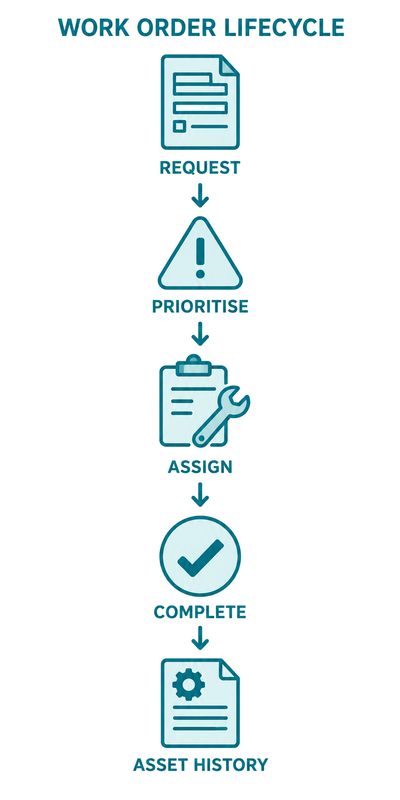
A work order moves through five stages: raised, prioritised and assigned, carried out, recorded, and closed. The recorded stage is the one most often skipped and the most valuable, because it turns completed work into a usable maintenance history.

  •     Raise: the job is captured with the asset, fault or task description, and any safety notes.
  •     Prioritise and assign: the job is ordered by consequence and given a clear owner.
  •     Carry out: the visible work happens.
  •     Record: parts, time, findings, and cost are captured against the asset.
  •     Close: the job is confirmed complete and, if scheduled, the next due date is reset.

Skip the recording step and you keep the equipment running but lose the data that would have explained why it keeps failing.

Work Order Tracking Best Practice

The core of good work order tracking: one shared, current list that everyone works from, clear priorities, and a discipline of recording completion. Every job is visible, its status is obvious, and nothing depends on a single person’s memory.

  •     Capture every job as a work order, however small, so nothing lives only in someone’s head.
  •     Prioritise by consequence, not by who reported the fault first.
  •     Assign clearly: each job needs one owner with no ambiguity.
  •     Record parts, time, and findings at completion. Unrecorded work is lost data.
  •     Review closed work orders regularly to spot assets that keep failing and tasks that recur.

Prioritising Work Orders

Prioritise work orders by the consequence of not doing them, not by who asked first. A safety-critical repair outranks a cosmetic one. A job on a production-critical asset outranks one on a spare. A clear, shared priority scheme stops the loudest request winning by default.

Most teams use a simple scale: safety, critical, routine, and low. The value is not the labels but the shared understanding. Everyone knows a safety job jumps the queue and a cosmetic one waits. Without that, prioritisation happens informally and inconsistently, which is how critical work ends up behind trivial jobs simply because the trivial job was reported more insistently.

Linking Work Orders to Asset History

Every work order should be tied to the asset it relates to, so the completed job becomes part of that asset’s permanent maintenance history. Over time that record shows which assets cost the most to keep running and which are candidates for replacement. Keeping that record reliable is covered in our guide to linking maintenance to asset records.

How a CMMS Manages Work Orders

A CMMS raises, assigns, and tracks work orders in one place, generates them automatically from preventive schedules, and records each completed job against its asset. FMIS equipment maintenance software handles scheduled and reactive work orders in the same system, keeps them tied to the asset record, and reports on status and cost, so the process stays reliable as volume grows.

Frequently Asked Questions

What is the difference between a work order and a work request?

A work request is a report that something needs attention. A work order is the approved, actionable job that results from it. Not every request becomes a work order, and a single work order can address several related requests.

What should a work order include?

At minimum: the asset, a description of the task or fault, the priority, the assigned person, and the due date. On completion it should also capture the work done, the parts and time used, and any findings, recorded against the asset.

Can you manage work orders on a spreadsheet?

For a small, low-volume operation, yes. The difficulty is keeping it current across a team, linking each job to asset history, and never missing scheduled work. Those are the points at which most teams move to a system.

How should work orders be prioritised?

Prioritise by the consequence of not completing the work. Safety-critical and production-critical assets come first. A simple four-level scheme (safety, critical, routine, low) agreed in advance removes the ambiguity that allows urgent but unimportant jobs to jump the queue.

How does a CMMS improve work order management?

A CMMS gives everyone one shared list, raises planned work orders automatically from the preventive schedule, and records completion against the asset. This reduces the risk of missed jobs and lost history, while giving management visibility of what is open, overdue, and closed without chasing email.

About the author

John de Robeck leads new business and partnerships at FMIS, working with organisations to understand asset and equipment maintenance requirements, software fit and related compliance considerations.

Read full bio

Share this content
  • Facebook Facebook Share on Facebook
  • X-twitter X-twitter Share on X
  • Whatsapp Whatsapp Share on WhatsApp
  • Linkedin Linkedin Share on LinkedIn
  • Mail Mail Share by Mail

Flow diagram showing the decision-making process between the different lease accounting standards for IFRS 16 and FRS 102

IFRS 16 vs FRS 102: Which Lease Accounting Standard Applies to You?

Compare IFRS 16 and FRS 102 lease accounting, including their scope, pre-2026 differences, the 2026 changes and the practical differences that remain.
https://www.fmis.co.uk/wp-content/uploads/2026/09/ifrs-16-vs-frs-102-lease-accounting-office-featured.webp 500 500 John de Robeck https://www.fmis.co.uk/wp-content/uploads/2026/04/FMISNavyTeal-1-150x80-1.webp John de Robeck2026-09-04 16:15:472026-09-29 16:33:37IFRS 16 vs FRS 102: Which Lease Accounting Standard Applies to You?
Simple flow diagrams showing the application of ASC 842 Lease Accounting for US GAAP Reporters

ASC 842 Lease Accounting: A Guide for US GAAP Reporters

Understand ASC 842 lease accounting, including classification, measurement, exemptions and the key differences from IFRS 16 and revised FRS 102.
https://www.fmis.co.uk/wp-content/uploads/2026/09/asc-842-lease-accounting-us-gaap-featured-image.webp 450 500 John de Robeck https://www.fmis.co.uk/wp-content/uploads/2026/04/FMISNavyTeal-1-150x80-1.webp John de Robeck2026-09-04 16:07:062026-09-29 16:34:53ASC 842 Lease Accounting: A Guide for US GAAP Reporters
Flow Diagram depicting the process to calculate right of use asset and lease liability

How to Calculate a Right-of-Use Asset and Lease Liability

Explore the calculation of lease liabilities and right-of-use assets under IFRS 16 and FRS 102, from present value and discount rates to depreciation.
https://www.fmis.co.uk/wp-content/uploads/2026/09/accounting-office-banner-calculating-lease-liability.webp 450 500 John de Robeck https://www.fmis.co.uk/wp-content/uploads/2026/04/FMISNavyTeal-1-150x80-1.webp John de Robeck2026-09-03 09:33:012026-09-29 16:30:34How to Calculate a Right-of-Use Asset and Lease Liability
IFRS 16 Journal entries flow diagram

IFRS 16 Journal Entries: A Step-by-Step Worked Example

A detailed guide to IFRS 16 journal entries, covering lease recognition, interest, liability repayments, depreciation and the transition to FRS 102 in 2026.
https://www.fmis.co.uk/wp-content/uploads/2026/09/diverse-accountants-ifrs16-lease-management.webp 450 500 John de Robeck https://www.fmis.co.uk/wp-content/uploads/2026/04/FMISNavyTeal-1-150x80-1.webp John de Robeck2026-09-03 09:27:172026-09-29 16:32:21IFRS 16 Journal Entries: A Step-by-Step Worked Example
Support Icon
Can we help?
Book a demo View products Contact support
Or call: +44 (0) 1227 773003
Mon–Fri, 9:00–17:00 (BST/GMT)

Explore More

  • What is new in FMIS Fixed Assets version 12.47
  • What is new in FMIS Lease Accounting version 12.47
  • AccountMate Fixed Asset Integration with FMIS
  • Asset Depreciation Methods Explained for UK Businesses
  • How to Conduct a Fixed Asset Audit: Step by Step

SOLUTIONS

  • Fixed Asset Management Systems
  • Asset Tracking
  • Purchase to Pay
  • Order Management
  • Equipment Maintenance
  • Lease Accounting
  • Stock and Inventory
  • View all solutions

Home › Articles › Work Order Management

Market Sectors

  • Commercial and Retail
  • Education
  • Local and Central Government
  • NHS and Health
  • Manufacturing
  • Non-profit
  • Oil, Gas and Energy

FOLLOW US

FMIS Twitter FMIS Linkedin

CONTACT US

FMIS Ltd
167b John Wilson Business Park
Whitstable
Kent
CT5 3RA
United Kingdom

Phone:+44 (0) 1227 773003
Fax:+44 (0) 1227 773005
Sales:sales@fmis.co.uk
Support:support@fmis.co.uk

Copyright © 2024 - All rights reserved www.fmis.co.uk
  • Privacy Policy
  • Cookie Policy
Scroll to top