Replace your paper-based Request For Quote process with automated RFQs from FMIS Order Processing to improve purchasing control and effectively manage vendor responses
Written by: John de Robeck • Published: March 30, 2021 • Updated: March 10, 2026
Automated RFQs with FMIS
You can now create RFQs quickly and easily in FMIS to effectively manage a Request for Quotes from multiple vendors and products. Using RFQ’s allows you to improve vendor communication, reduce procurement costs and ensure materials are available where and when they are needed.
You can now add RFQ to Quotes, Sales Orders, Requisitions and as a basis for raising Purchase Orders. The RFQ allows you to:
Allocate multiple vendors
Allocate multiple products
Add new products
Allocate RFQs to one or more project or project groups
Use a workflow to agree on the scope of RFQ requests
Send email requests to multiple vendors for relevant products
Track individual vendor responses
Compare responses and select the best price/delivery option
Automatically create Purchase Orders and update Quotes, Sales Orders and Requisitions
Vendors
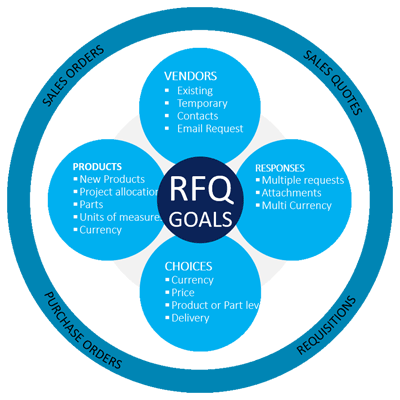
You can set up multiple vendors including default selections for individual products. With new suppliers, you can create temporary vendors for RFQ communications and add additional vendor contacts as you move through the RFQ.
Products
A wide range of product information is automatically available for RFQs including vendor part numbers and prices. You can add additional information or instructions for vendors as attachments emailed with your requests. Project groups or multiple projects can be allocated to separate product lines.
Responses
Specific products within the RFQ may be limited to specific vendors giving you the flexibility to tailor each RFQ document you send. Vendor responses are held against the RFQ history providing a full audit trail for each RFQ including any attachments received back from the vendor.
Vendor Selection
Aggregated responses can easily be compared allowing you to choose the best supplier for each product line to optimise cost and delivery. Once a vendor is selected buyers can automatically create a new Purchase Order, or update the original Sales Quote, Sales Order or Requisition. Specific workflows ensure that all necessary approvals are gained before an order can be placed.
FMIS recognised for Easy Implementation in the SoftwareSuggest 2024 awards
https://www.fmis.co.uk/wp-content/uploads/2024/03/SoftwareSuggest-Awards-2024-495x400-1.webp400495John de Robeckhttps://www.fmis.co.uk/wp-content/uploads/2026/04/FMISNavyTeal-1-150x80-1.webpJohn de Robeck2024-03-26 10:29:322026-03-10 10:57:34SoftwareSuggest Awards – FMIS recognised for easy implementation
A comprehensive guide to Asset Valuation covering the four main methods, when to use them and the strengths and weakness of each
https://www.fmis.co.uk/wp-content/uploads/2023/10/Asset-Valuation-Methods-495x400-1.jpg400495John de Robeckhttps://www.fmis.co.uk/wp-content/uploads/2026/04/FMISNavyTeal-1-150x80-1.webpJohn de Robeck2023-10-26 13:16:202026-07-01 10:14:59Asset Valuation Methods
FMIS announces new partnership with NHS Shared Business Services to supply FMIS Fixed Assets and IFRS 16 Leasing software to their clients.
https://www.fmis.co.uk/wp-content/uploads/2019/06/Feature-image-495x400.jpg400495John de Robeckhttps://www.fmis.co.uk/wp-content/uploads/2026/04/FMISNavyTeal-1-150x80-1.webpJohn de Robeck2019-12-18 11:23:412026-03-10 11:09:42FMIS announces new NHS partnership
FMIS to sponsor GovMoney2019 conference for public sector finance professionals.
https://www.fmis.co.uk/wp-content/uploads/2019/11/Govmoney2019-495x400.jpg400495John de Robeckhttps://www.fmis.co.uk/wp-content/uploads/2026/04/FMISNavyTeal-1-150x80-1.webpJohn de Robeck2019-12-02 17:25:102026-03-10 11:09:51FMIS to sponsor GovMoney 2019


 You can now create RFQs quickly and easily in FMIS to effectively manage a Request for Quotes from multiple vendors and products. Using RFQ’s allows you to improve vendor communication, reduce procurement costs and ensure materials are available where and when they are needed.