IFRS 16 lease accounting software

FMIS Lease Accounting helps finance teams manage lease liabilities, right-of-use (ROU) assets and period reporting under IFRS 16. Maintain property, vehicle and equipment leases through new agreements, changes and terminations, with calculation schedules and general ledger posting outputs. Explore the capabilities and implementation options below, or arrange a demo around your lease portfolio.

Updated by: • Updated: October 12, 2026

Is FMIS suitable for your IFRS 16 reporting?

FMIS is designed for lessee financial accounting: the organisation using the leased asset. It is relevant to finance managers, financial controllers and group reporting teams that need a maintained lease register and repeatable accounting outputs.

  • Replace separate spreadsheets with lease records, schedules and a retained history of adjustments.
  • Review values by lease, reporting period, company or company group.
  • Connect lease accounting with the associated ROU asset records and your finance-system posting process.

A spreadsheet may remain practical for a small, stable portfolio. Dedicated software becomes more useful when lease changes, reporting requirements or the number of people maintaining records make review harder.

How FMIS supports IFRS 16 lease accounting

FMIS maintains the lease information and calculates the accounting values from the terms and assumptions you enter. Your finance team determines the accounting treatment, including the lease term, discount rate and any exemption election.

Calculate liabilities and ROU values

Build payment schedules with advance or arrears payments, different payment cycles and payment holidays. Review present values, interest and opening and closing liabilities, alongside the related ROU asset information.

Process mid-term adjustments

Record mid-term adjustments to payments, terms and interest rates through the adjustment process. Preview the revised calculation and retain earlier numbered lease versions for review. Individual and Excel-based adjustment routes are available.

Prepare period reporting and journals

Use standard reports to review lease values and reconcile movements. Configure general ledger rules and account mappings to produce posting outputs for your finance system, with period closing controls to protect reviewed values.

What does IFRS 16 require?

IFRS 16 is the IFRS Accounting Standard for leases. For most leases in scope, a lessee recognises a right-of-use asset and a lease liability. It has applied to annual reporting periods beginning on or after 1 January 2019, replacing IAS 17.

Identify the lease and agree the inputs

Assess whether a contract gives the customer control over the use of an identified asset. Property, vehicle and equipment agreements are common examples; a service contract can also contain a lease. Assess extension and termination options when determining the lease term, and separate lease and non-lease components unless a permitted policy election applies.

Measure the asset and liability

The initial liability is the present value of lease payments unpaid at commencement. Use the rate implicit in the lease where readily determinable; otherwise use the lessee’s incremental borrowing rate. The initial ROU asset also reflects relevant prepayments, incentives, initial direct costs and restoration obligations, so it may differ from the liability.

Review subsequent changes and exemptions

Under the usual cost model, the ROU asset is depreciated and assessed for impairment; the liability changes with interest, payments and relevant remeasurements. Optional recognition exemptions cover qualifying short-term leases and leases of low-value underlying assets. They require an accounting assessment rather than a simple filter on the payment amount.

Read the IFRS Foundation’s IFRS 16 overview and implementation materials. These explain the standard; the sections below show how FMIS supports the accounting process.

For a worked example and practical detail on measurement, changes and reporting, read the IFRS 16 lease accounting guide.

From lease records to reviewed changes

Keep the inputs and supporting information together

Create leases individually or import them using a system-generated Excel template. Record payment terms, analysis codes, descriptions and notes, and attach supporting documents to the lease record.

Review the calculated schedule

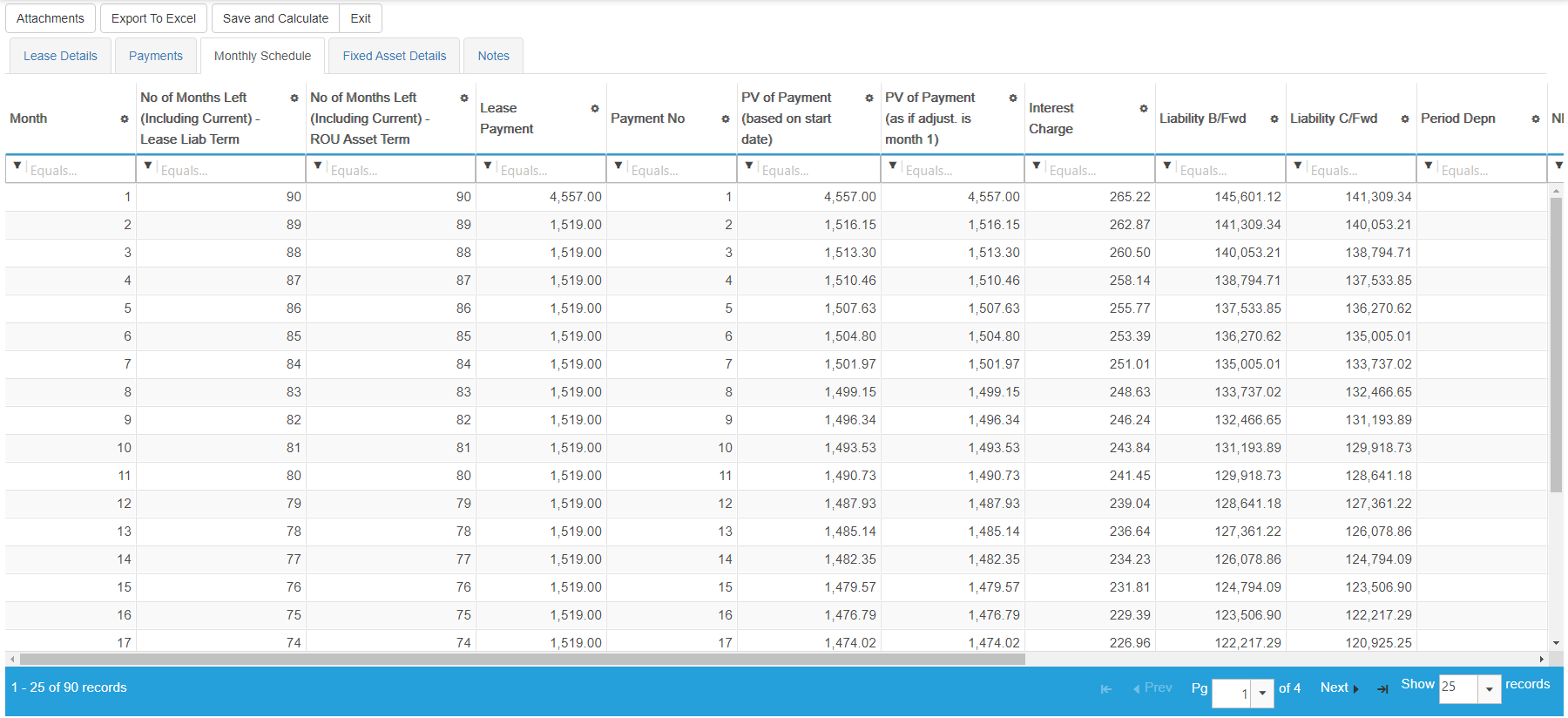
Use the monthly schedule to check payments, present values, interest and liability balances. ROU depreciation is calculated through the underlying FMIS Fixed Assets functionality; the configuration determines how the lease and asset records are linked.

FMIS monthly lease schedule showing payments, present values, interest and opening and closing liability balances.
Example monthly lease schedule from the FMIS Lease Accounting user manual. Displayed columns depend on the saved screen layout. Open the full-size screenshot.

Process mid-term adjustments and early terminations

For a rent review, extension or other change, enter the appropriate effective date and revised inputs, then preview the payment calculation before completing the adjustment. FMIS saves a new numbered version and retains the previous version. Early termination processing is also available.

Apply the correct treatment to the change

A contractual modification and a remeasurement under existing terms can require different discount-rate treatment. FMIS supports revised inputs and calculations; your finance team determines the treatment and effective date. Work through a representative index-linked rent change or extension during the demo.

IFRS 16 reporting and period controls

Choose an output for the task you need to complete. Standard reports can be run for a company or company group, with analysis fields to support review. Most reports offer PDF or Excel output; the Audit Log is Excel-only.

The standard reporting suite covers a wide range of IFRS 16 accounting needs, with flexible selection and analysis options. Bespoke reports are rarely needed; unusual reporting requirements can be assessed during scoping.

Reporting tasks and relevant FMIS outputs
Reporting task FMIS output or process
Check lease-by-lease period values Lease Values by Period and Lease Details reports, with analysis codes and period values for review.
Reconcile liability and ROU asset movements Reconciliation Report for full roll-forward reporting of liability and ROU asset movements over the selected year or period range, including separate new-lease and later-adjustment additions in the Excel output.
Review current and non-current liability Values by Year report for aged analysis of key lease figures, with short, medium and long-term time bands and related payment and interest information.
Review future contractual payments Future Payments report. Check the lease population, reporting date, selected version and exclusion of non-lease charges when preparing an undiscounted maturity analysis.
Prepare general ledger posting outputs Configured GL rules, code derivations and account mappings. Agree the transfer format and review the postings before import.
Review who changed a record Retained lease versions and the Audit Log report, filtered by date, lease, user and event. Audit Log output is an Excel download.

Use the reports to prepare the disclosure working papers

IFRS 16 disclosures include ROU carrying amounts and depreciation, interest expense, additions, cash outflows and a maturity analysis of lease liabilities. FMIS reports provide relevant accounting data. Reconcile that data with other records and prepare any further amounts and narrative disclosures required for your arrangements.

Protect the reviewed period

Closing a period protects its reviewed values. A period can be reopened where necessary. Reopening in FMIS does not remove postings already transferred to your finance system; those entries must be reconciled and adjusted through your agreed process.

Handle lease information received after period close

Alternatively, new leases and mid-term adjustments can be backdated so their earlier effective date is recognised, with the accumulated impact posted in the current open month. Closed periods remain unaffected. This helps your team account for lease information received late without reopening completed periods.

St Georges NHS Fixed Asset and Lease Accounting Case Study hero image

Customer experience: linking leases and existing assets

St George’s University Hospitals NHS Foundation Trust

St George’s selected FMIS Fixed Assets in 2017 and added Lease Accounting in 2022 to support its IFRS 16 transition. Both modules now use UK cloud hosting.

Existing finance leases needed to be linked with assets already on the register. FMIS provided an import process that retained existing asset identifiers and linked the records, helping the Trust avoid duplicate ROU assets. The finance team also received guidance on reconciling lease and asset values.

Read the St George’s fixed asset and lease accounting case study.

Migration, implementation and finance-system transfer

Moving an existing IFRS 16 portfolio into FMIS is a data and reconciliation exercise. It does not automatically mean adopting the standard again. Agree a migration date and the opening position before importing the records.

Prepare the lease information

Your team identifies the leases in scope and supplies the agreed accounting assumptions. FMIS can help agree the lease attributes to be held, system configuration and required outputs.

  • Lease references, companies, asset descriptions, commencement dates and assessed lease terms.
  • Payment amounts, timing, frequency, incentives, direct costs and agreed discount rates.
  • Existing adjustments, supporting documents, analysis codes and asset references where records need to be linked.

Validate the starting position

FMIS provides Excel import templates that reflect the configured fields and identifies row-level import errors. Agree how existing leases will be brought in, then reconcile the lease population, liability balances, ROU carrying values and reporting outputs with the source records and general ledger.

Configure the process and train the team

Implementation can cover company structures, analysis codes, reporting periods, user permissions, lease-to-asset links and GL mappings. Test representative leases, adjustments, reporting and posting outputs before the first live close. Training should cover the people maintaining records and those reviewing the figures.

Transfer postings into your finance system

Agree the account codes, file format and transfer process for your accounting or ERP system. The standard capability is configurable posting output; a direct interface depends on the destination system and the agreed scope. Review how payment and depreciation entries are currently produced so that postings are not duplicated.

Plan around your first close

Allow time for data preparation, reconciliation, user testing and training. The implementation timetable depends on the source data, the configuration and the availability of your finance team.

FMIS Trust and Security for Industry Sectors

Cloud or on-premise deployment

FMIS Lease Accounting is available through FMIS Cloud or as an on-premise installation. Confirm hosting, access and data residency requirements as part of the proposed deployment.

FMIS Cloud

For the UK-hosted service, customer data is held in UK data centres, with encryption in transit and at rest, controlled access, backups and recovery arrangements.

Your own environment

An on-premise installation is available where your organisation needs to host the software itself. Agree the infrastructure and operational responsibilities during scoping.

Information for your IT and procurement teams

FMIS holds ISO 27001, ISO 9001 and Cyber Essentials Plus certifications. The FMIS Trust Centre provides current information about security controls, testing, data protection and business continuity.

IFRS 16 software FAQs

IFRS 16 applies to lease accounting under IFRS Accounting Standards, subject to its scope and exemptions. UK organisations applying FRS 102 use that framework’s lease requirements instead. Public-sector reporting can also involve adaptations in the relevant accounting manual; confirm the framework applying to your organisation.

A lessee can elect recognition exemptions for qualifying leases. A short-term lease has a term of 12 months or less at commencement and no purchase option. Low value is assessed using the underlying asset’s value when new; IFRS 16 does not set a fixed monetary threshold. FMIS can report separately on leases flagged as short term or low value, but your finance team must assess eligibility and the policy election.

FMIS supports lease adjustments, revised payment schedules and termination processing. Changes can be entered individually, and Excel imports are available for adjustments and terminations. A completed adjustment retains the earlier lease version. The accounting treatment, effective date and discount rate must reflect the particular change.

Your finance team supplies the agreed assumptions. FMIS calculates the schedule from the entered inputs and supports changes to rates and terms. The evidence for the selected rate, options and other judgements should be retained with the accounting working papers.

FMIS provides reporting data for balances, movements, period values and future payments. These outputs support disclosure preparation. Finance teams still need to reconcile the figures and prepare any additional amounts and narrative disclosures required for their contracts.

Yes. FMIS Lease Accounting supports multiple companies, company access permissions and company-group reporting. Agree the company structure, coding and reporting needs during implementation.

FMIS Lease Accounting does not currently support multi-currency. If your portfolio includes leases in different currencies, please raise this during the initial discussion so we can assess suitability.

Yes. FMIS uses Excel import templates for new leases, with validation of the uploaded data. For an existing portfolio, agree the migration method, starting balances and treatment of earlier changes, and reconcile the results before relying on the first live reporting period.

IFRS 16 uses a single lessee accounting model for most leases. Revised FRS 102 brings a broadly similar on-balance-sheet model for periods beginning on or after 1 January 2026, with differences in requirements and reliefs. ASC 842 retains finance and operating lease classifications for lessees. Confirm the required framework and outputs when scoping FMIS.

A quote depends on the lease portfolio, company structure, users, deployment and implementation scope. Data migration, training and any finance-system interface requirements also affect the proposal. Provide these details so that FMIS can quote for the work your organisation needs.

See how FMIS would handle your lease portfolio

Arrange a demonstration covering a representative lease, a change to its terms, the reporting outputs and the posting process. Let us know your reporting framework, approximate lease numbers, company structure, finance system and target reporting date so that we can focus on the areas that matter to you.


Please let us know a few details to set up your demo. In the message field, include your approximate lease numbers and reporting framework, including any additional standards you report under. Alternatively, you can call us directly on +44 (0) 1227 773003 to arrange a time.

    Name *

    Organisation *

    Email *

    Phone *

    Additional information

    What do you require?

    We ask for a few details so we can send the right information and follow up appropriately.

    We do not pass your contact details outside FMIS.

    Choose a time

    Schedule a call to discuss your lease portfolio, reporting process and implementation requirements with FMIS.

    Select a time using the calendar below to speak with a consultant. Alternatively, you can contact us here.

    • 10-20 minute call with an FMIS consultant.
    • You will receive Microsoft Teams call joining details via email after booking.

    Get a quote

    Complete the form below for a tailored quote for your organisation. Include your approximate lease numbers, reporting framework, company structure and finance system in the message field. Alternatively, call us on +44 (0) 1227 773003 to speak with one of the team.

      Name *

      Company *

      Email *

      Phone *

      How many user licences do you need?

      How many assets are you tracking?

      How many separate companies do you want to manage?

      Is there anything further you can tell us that will help us understand your requirements?

      Which FMIS products do you require?

      Please note that your estimated quote will include hosting, training, and set-up costs.

      For on-premise solutions, please reply to the email we send you or contact us directly.

      This quote is provided as an estimate based on the information available and may include certain assumptions. Please review the details carefully to ensure they reflect your requirements.

      Download a brochure

      Complete the form below to download an FMIS brochure, or alternatively, call us on +44 (0) 1227 773003 to speak with one of the team.

        First name*

        Last name*

        Job title*

        Company*

        Email address*

        Phone number

        Anything else we should know?

        What would you like information about?*


        We ask for a few details so we can send the right information and follow up appropriately. We use your details to respond to your enquiry. See our Privacy Policy.